You’re evaluating workforce management software, but the deployment model decision isn’t straightforward.
Cloud-based workforce management solutions account for over 65% of deployments, offering scalability and remote accessibility, while on-premise systems offer complete data sovereignty.
Your choice of cloud vs. on-premise workforce management software impacts everything from implementation timelines to long-term scalability. With 74% of mobile workers reporting higher customer expectations, the traditional either-or approach may not fit your operational reality.
The wrong decision could cost you competitive advantage in today’s distributed work environment.
Table of Contents
Understanding Workforce Management Deployment Options
When evaluating workforce management software, your organization will encounter two primary deployment models: cloud-based solutions and on-premise installations. Each option directly impacts your technology infrastructure requirements and operational capabilities.
Cloud deployments offer superior deployment flexibility, letting you scale resources instantly without hardware investments, access systems from anywhere, and enable seamless remote workforce management across distributed teams.
On-premise solutions provide complete data control but demand substantial IT resources and maintenance. Your choice affects implementation speed, total cost of ownership, and system accessibility.
Cloud platforms typically deploy within days, while on-premise installations require weeks of configuration. Consider your security requirements, budget constraints, and growth projections.
Understanding these fundamental differences empowers you to select the deployment model that liberates your workforce from operational limitations.
Cloud-Based Workforce Management Software: Advantages and Considerations
Cloud-based workforce management software delivers significant operational advantages through reduced infrastructure costs, automatic updates, and scalable deployment capabilities.

However, you must also consider potential constraints, including data security dependencies, internet connectivity requirements, and limited customization options compared to on-premise alternatives.
Your evaluation should balance these factors against your organization’s specific compliance requirements, budget constraints, and technical infrastructure readiness.
Key Benefits of Cloud Solutions
As organizations evaluate workforce management solutions, cloud-based systems offer distinct operational advantages that directly impact your bottom line. It reduced IT overhead by eliminating hardware maintenance and automatic updates. Teams gain remote access, enabling workforce management from any location with internet connectivity. This flexibility supports resource scaling without infrastructure constraints.
Key strategic benefits include:
- Real-time data synchronization across multiple locations, empowering instant decision-making
- Predictive analytics dashboards that transform workforce patterns into actionable insights
- Automated compliance tracking ensures regulatory adherence without manual intervention
Cloud solutions deliver measurable ROI through 40% average reduction in administrative costs while increasing operational agility. They shift workforce management from a cost centre to a strategic advantage.
Potential Drawbacks of Cloud Systems
Security vulnerabilities remain the primary concern when implementing cloud-based workforce management systems. Facing data storage concerns when sensitive employee information resides on third-party servers beyond your direct control.
System reliability issues can disrupt operations when internet connectivity fails or vendors experience outages, costing you productivity and revenue.
You’re also confronting vendor lock-in concerns that limit your flexibility. Migration costs escalate when switching providers, as proprietary formats trap your data.
Customization options often lag behind on-premise alternatives, forcing workarounds that compromise efficiency.
While cloud solutions promise freedom from infrastructure management, they introduce dependencies that can constrain your strategic autonomy. Weigh these limitations against potential benefits, ensuring your chosen path aligns with long-term operational goals.
On-Premise Workforce Management Software: Pros and Cons
On-premise workforce management software offers distinct advantages, including complete data control, customizable security protocols, and elimination of recurring subscription fees.

However, these systems present substantial upfront capital requirements, ongoing maintenance responsibilities, and limited scalability compared to cloud alternatives.
Your decision between on-premise and cloud deployment directly impacts your IT infrastructure costs, system flexibility, and long-term operational efficiency.
Advantages of On-Premise Solutions
Control remains the cornerstone advantage when you deploy workforce management software on-premise, giving you full authority over your infrastructure and ensuring reliable data management without third-party dependencies.
Your IT team exercises direct oversight of:
- Physical servers: Touch, configure, and optimize hardware matching your exact specifications
- Network architecture: Design custom pathways for data flow between departments and locations
- Security protocols: Implement military-grade encryption and access controls tailored to your industry
You’re freed from vendor lock-in and subscription limits. Reporting runs faster on local networks, avoiding cloud latency. IT management simplifies when using technologies your team already knows.
On-premise solutions deliver predictable performance metrics, enabling strategic capacity planning based on concrete usage data rather than provider limitations.
Challenges with On-Premise Systems
The hefty upfront capital investment for on-premise workforce management software often catches organizations off guard, with initial hardware costs ranging from $50,000 to $500,000, depending on company size.
Data migration challenges occur when transferring legacy information to new systems, requiring 3-6 months of dedicated IT resources.
Your IT infrastructure overhead compounds annually, with server maintenance, security patches, and system upgrades consuming 15-20% of your technology budget.
The support and maintenance burden falls entirely on your internal team, demanding specialized expertise you’ll struggle to retain.
You’re locked into rigid upgrade cycles, missing critical innovations while competitors leverage cloud-based agility. These constraints limit your ability to scale operations dynamically, undermining the flexibility modern businesses need to thrive.
Cost Analysis: Cloud vs On-Premise Investment
After workforce management solutions, calculate the total cost of ownership (TCO) across multiple years to make an informed investment decision.
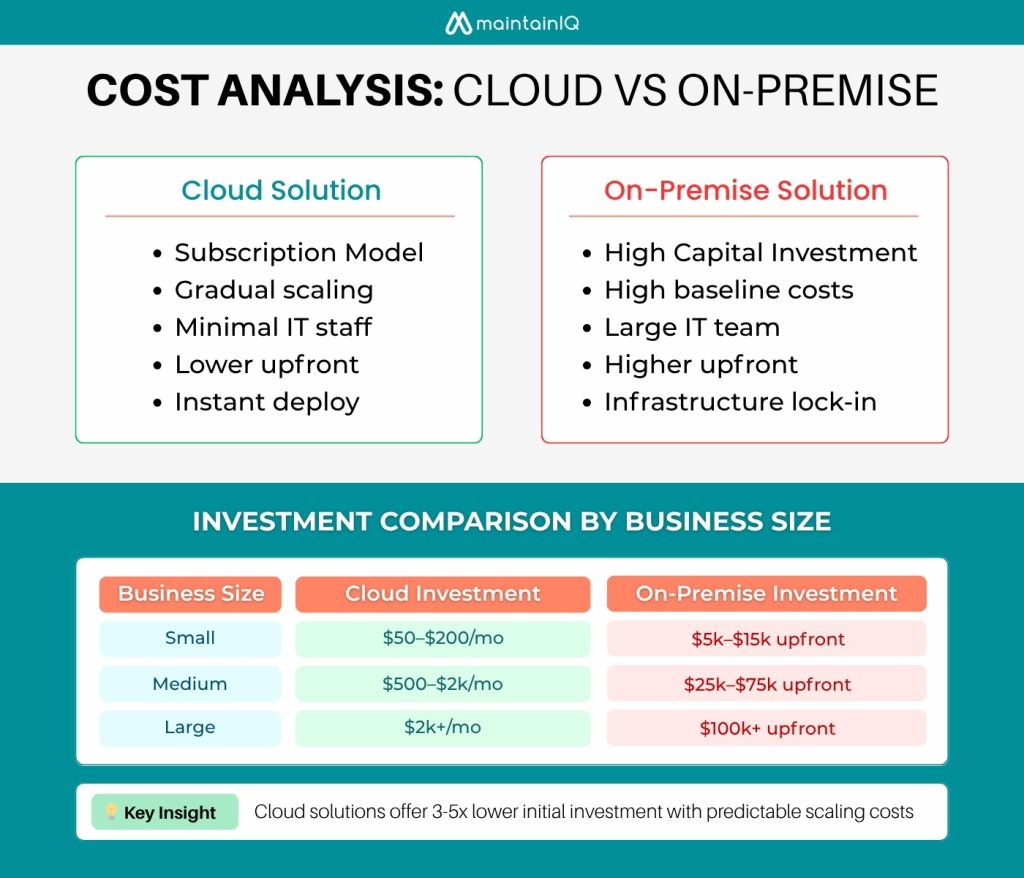
Your TCO analysis should factor in upfront licensing fees, implementation costs, ongoing maintenance expenses, and hidden costs like IT staff time for on-premise systems versus predictable subscription fees for cloud platforms.
The best choice varies based on your organization’s size, with enterprises potentially achieving economies of scale with on-premise deployments while small to mid-sized businesses typically benefit from cloud solutions‘ lower barrier to entry and reduced infrastructure requirements.
Total Cost of Ownership Breakdown
As you evaluate workforce management software options, understanding the complete financial picture requires looking beyond initial purchase prices to examine total cost of ownership (TCO) over a typical five-year deployment period. You’ll discover that total ownership calculations reveal surprising disparities between deployment models.
Cloud solutions transform capital expenditures into predictable operating expenses, freeing your organization from infrastructure constraints. On-premise deployments demand substantial upfront investment but offer long-term control.
Your TCO analysis must encompass:
- Infrastructure costs: Servers, storage, networking equipment, plus ongoing maintenance
- Human resources: IT staff salaries, training, and opportunity costs
- Hidden expenses: Energy consumption, disaster recovery, security upgrades
Breaking free from budget limitations requires accurate TCO modeling that captures both visible and concealed costs across your software’s lifecycle.
Cost Considerations by Business Size
Organization size fundamentally reshapes the cost dynamics between cloud and on-premise workforce management deployments.
| Business Size | Cloud Investment | On-Premise Investment |
| Small (1–50) | $50–200/month | $5,000–15,000 upfront |
| Medium (51–500) | $500–2,000/month | $25,000–75,000 upfront |
| Large (500+) | $2,000+/month | $100,000+ upfront |
Small business budgets can’t absorb massive upfront investments, making cloud’s predictable monthly fees attractive. You’re freed from hardware maintenance and IT overhead.
Medium-sized enterprises have access to flexible resources—you can leverage existing infrastructure or take advantage of cloud scalability.
Your decision hinges on growth projections and cash flow preferences. Cloud delivers immediate deployment without straining capital reserves, while on-premises offers long-term control for organizations with robust IT capabilities.
Decision Framework: Choosing the Right Solution
When choosing between cloud and on-premise workforce management software, evaluate three key dimensions that affect system performance and ROI.

Your organization’s size and complexity determine architecture needs, while existing infrastructure influences integration and deployment.
Importantly, model your 3-5 year growth to ensure the solution can scale without costly migrations or architecture changes overhauls.
Business Size and Complexity Factors
The scale of your operations directly impacts whether cloud or on-premise workforce management software will deliver ideal ROI. Your workforce size determines infrastructure needs—cloud solutions excel at scaling from 50 to 50,000 employees without hardware investments.
Consider your organizational structure’s complexity:
- Distributed teams: Cloud enables real-time synchronization across multiple locations
- Matrix organizations: On-premise offers granular control for intricate reporting hierarchies
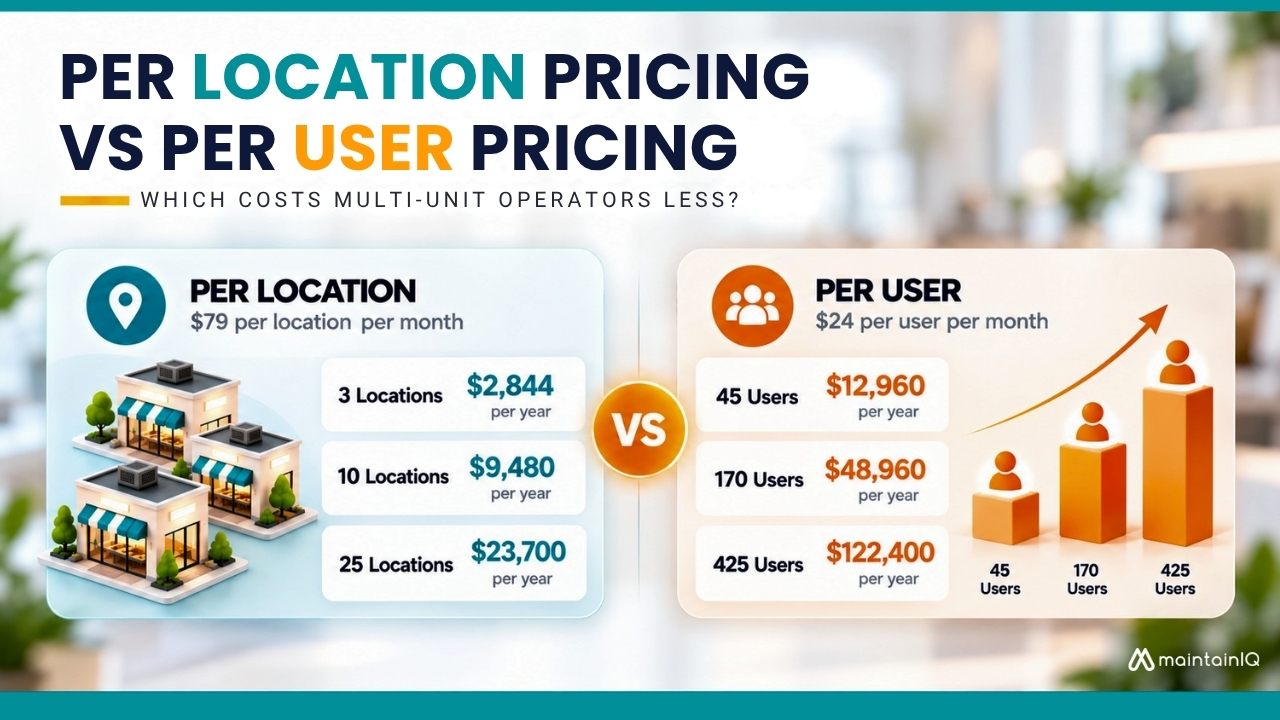
- Seasonal fluctuations: Cloud’s pay-per-user model prevents overspending during downturns
Your geographic footprint influences deployment. Multi-national operations benefit from cloud’s accessibility, while single-site manufacturers may prefer on-premise security. Companies with 500+ employees across multiple locations often implement cloud 40% faster.
Analyze growth; expanding businesses need cloud’s flexibility.
Technical Infrastructure Assessment
Beyond organizational scale, evaluating your existing technical infrastructure determines which deployment model aligns with your IT capabilities and resources. Conduct a thorough technical infrastructure analysis examining your current hardware, network capacity, and security protocols.
Cloud solutions free you from maintaining servers and managing updates, while on-premise systems demand robust IT environment review processes and dedicated personnel.
Consider your system architecture planning requirements. If you’re running legacy applications or need specific integrations, on-premise might offer better control. However, cloud platforms provide automatic scalability and eliminate infrastructure constraints that limit growth.
Assess your team’s technical expertise, budget for hardware refreshes, and disaster recovery capabilities. This evaluation reveals whether you’re equipped for on-premise management or better positioned to leverage cloud flexibility.
Growth and Scalability Planning
As you map your organization’s trajectory over the next 3-5 years, scalability planning becomes the critical differentiator between cloud and on-premise workforce management solutions. Cloud platforms deliver flexible scaling capabilities that align with your streamlined growth strategies, eliminating capital expenditure spikes during expansion phases.
Consider these scalable infrastructure planning factors:
- Dynamic Resource Allocation: Cloud solutions automatically adjust computing power during peak scheduling periods, while on-premise systems require manual hardware upgrades
- Geographic Expansion: Cloud platforms enable instant deployment across new locations without physical infrastructure investments
- User Capacity Scaling: Pay-per-user models accommodate workforce fluctuations without overprovisioning
Cloud solutions reduce scaling complexity by 67% compared to on-premise alternatives, liberating your IT resources from maintenance tasks, allowing focus on strategic initiatives that drive competitive advantage.
Industry-Specific Considerations
Your restaurant or retail operation faces unique workforce challenges that directly impact your software deployment choice.
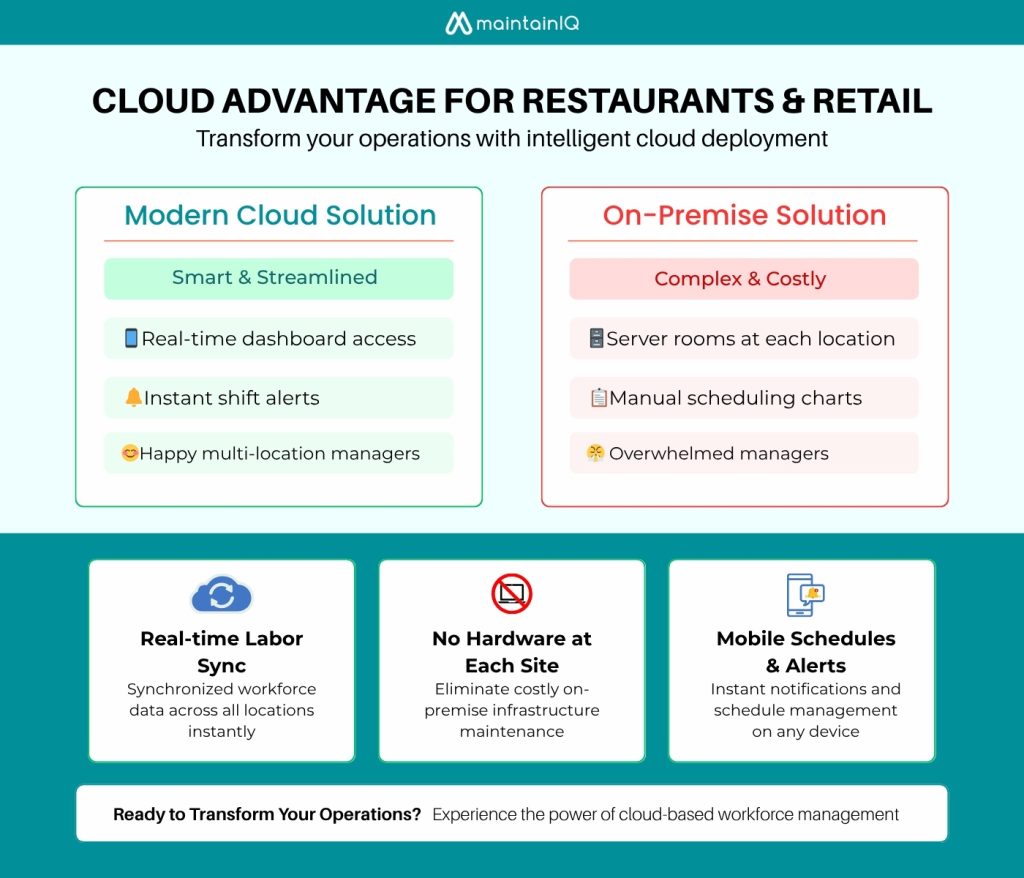
Evaluate whether cloud-based solutions can handle high-volume shift scheduling, real-time labor tracking across multiple locations, and integration with point-of-sale systems during peak transaction periods.
These sectors typically process 40-60% more schedule changes than other industries, making system flexibility and mobile accessibility critical factors in your platform selection.
Restaurant and Retail Operations
When you’re managing multiple restaurant locations, cloud-based workforce management solutions like MaintainIQ offer real-time visibility across all sites through centralized dashboards, instant deployment of schedule changes, labor cost adjustments, and operational updates across your entire restaurant chain within seconds rather than hours, and mobile accessibility.
You’ll gain immediate access to labor analytics, scheduling optimization, and compliance tracking without maintaining costly on-premise infrastructure at each location.
MaintainIQ: Cloud-Based Solution for Restaurant Chains
Restaurant chains face unique operational challenges that traditional workforce management solutions often fail to address—from managing multiple locations and varying labor laws to coordinating maintenance schedules across distributed assets.
MaintainIQ transforms workforce optimization through:
- Predictive labor scheduling algorithms analyze real-time sales data
- Cross-location resource sharing for maximum efficiency
- Automated compliance tracking across jurisdictions
You’ll enhance customer experience while reducing operational costs.
Security and Compliance Comparison
When evaluating security protocols for workforce management software, weigh cloud providers‘ enterprise-grade security standards against the direct control offered by on-premise solutions.

Cloud vendors typically maintain SOC 2, ISO 27001, and HIPAA certifications while implementing automated threat detection and 24/7 monitoring across their infrastructure.
On-premise deployment grants complete authority over security configurations, access controls, and data residency, but you’re responsible for maintaining compliance frameworks and responding to evolving cyber threats with internal resources.
Cloud Security Standards
Cloud workforce management platforms must adhere to rigorous third-party security standards that often exceed what most organizations can implement independently. You’ll benefit from enterprise-grade protection without shouldering the full burden of security management.
Leading cloud providers maintain:
- 256-bit AES data encryption for information at rest and in transit
- Quarterly compliance audits by independent security firms verifying SOC 2, ISO 27001, and GDPR adherence
- Multi-factor authentication and role-based access controls protect against 99.9% of automated attacks
These frameworks eliminate complex infrastructure demands and ensure workforce data stays protected.
Cloud vendors invest millions annually in security—outsourcing to specialists who make protection their business.
On-Premise Security Control
Implement on-premises security standards that align precisely with your industry requirements, designing custom firewalls, access controls, and encryption protocols without vendor limitations.
Your IT team maintains complete oversight of on-premise security protocols, conducting real-time monitoring and instant threat response.
Deploying: physical server access restrictions, network segmentation, and tailored authentication systems.
While this approach demands significant technical expertise and resources, it liberates you from third-party dependencies.
You can instantly modify, perform unscheduled audits, and maintain data sovereignty—critical advantages when regulatory compliance or intellectual property (IP) protection drives your decisions.
Implementation and Migration Considerations
Cloud deployment typically takes 2-6 weeks with minimal IT infrastructure requirements, while on-premise installations demand 3-6 months for hardware procurement, system configuration, and network setup.

Cloud implementation process centers on data migration, user provisioning, and API integrations, whereas on-premise deployments require you to manage server specifications, database installations, and security configurations.
Assess your organization’s technical resources, timeline constraints, and change management capacity to determine which implementation approach aligns with your operational readiness and business continuity requirements.
Cloud Implementation Process
60% of cloud migrations run over schedule due to technical dependencies, data volumes, and training needs.
Here’s what you’ll navigate during implementation:
- Discovery Phase: Audit existing workflows, identify integration points, and map data dependencies
- Pilot Testing: Deploy limited functionality to validate performance metrics and user acceptance
- Phased Rollout: Migrate departments systematically while maintaining parallel systems
Your cloud deployment timeline typically spans 3-6 months for mid-sized operations. Define milestones, success metrics, and rollback procedures to avoid rushed, inefficient launches.
On-Premise Setup Requirements
Five critical infrastructure components determine your on-premise deployment success: server specifications, network architecture, database configuration, security protocols, and disaster recovery systems. You’ll need substantial hardware specifications to handle workforce data processing demands while maintaining system performance.
| Component | Minimum Requirements |
| CPU Cores | 16–32 cores |
| RAM | 64–128 GB |
| Storage | 2–4 TB SSD RAID |
Your infrastructure requirements extend beyond raw computing power, involving complex tasks like configuring authentication, redundant networks, and backup protocols, each requiring specialized skills and ongoing maintenance.
Breaking free from vendor constraints means accepting responsibility for system architecture decisions. Controlling from security hardening to performance optimization enables complete customization for your unique operational needs.
Future-Proofing Your Workforce Management Strategy
Technology disruptions and evolving workforce expectations demand that you build adaptability into your workforce management infrastructure today. You can’t afford systems that lock you into yesterday’s processes while your competitors leverage emerging workforce forecasting strategies.

Build adaptability into your workforce infrastructure today—rigid systems can’t compete with emerging workforce forecasting strategies.
Future-proof your approach by integrating:
- Cloud-native platforms that scale with your talent retention planning initiatives
- API-first architectures enabling seamless employee productivity tracking across tools
- Modular systems that adapt as workforce dynamics shift
Your liberation from rigid infrastructure starts with choosing solutions that evolve alongside regulatory changes, remote work trends, and generational workforce preferences.
Data shows organizations with flexible WFM systems achieve 40% faster adaptation to market disruptions. Don’t let legacy constraints dictate your strategy—choose technology that empowers continuous transformation and operational excellence.
Frequently Asked Questions
Can We Switch From Cloud to On-Premise After Initial Deployment?
Like switching ships mid-voyage, you’ll face migration process complexity when shifting deployments. You’ll need strategic planning for data transfer, considering on-premise maintenance costs versus cloud flexibility of deployment. It’s technically feasible but requires liberation-minded execution.
What Happens to Our Data if the Cloud Provider Goes Bankrupt?
Your data security concerns demand proactive breach prevention measures. You’ll need thorough cloud provider due diligence including bankruptcy clauses, data portability guarantees, and escrow agreements. Guarantee you’ve got automated backups and migration rights protecting your digital assets.
How Many IT Staff Members Are Needed to Maintain On-Premise Systems?
You’ll need 2-5 dedicated IT staff members based on system complexity. Factor in maintenance costs reaching $50,000-200,000 annually. Infrastructure upgrades demand specialized expertise, freeing you from vendor dependencies while requiring strategic resource allocation for true operational independence.
Do Cloud Solutions Work Reliably in Areas With Poor Internet Connectivity?
Just as you’re implementing bandwidth optimization, you’ll discover cloud solutions offer reliable offline access modes. You can deploy cellular fallback solutions, ensuring 99.9% uptime even in connectivity-challenged regions, liberating your operations from infrastructure limitations.
Which Deployment Option Offers Better Disaster Recovery Capabilities?
You’ll find cloud deployment’s geographic server locations and automated data backup strategies deliver superior disaster recovery capabilities. Multiple system redundancy options across distributed infrastructure guarantee your operations continue uninterrupted, freeing you from single-point failures.