Cooper-Atkins (Copeland)
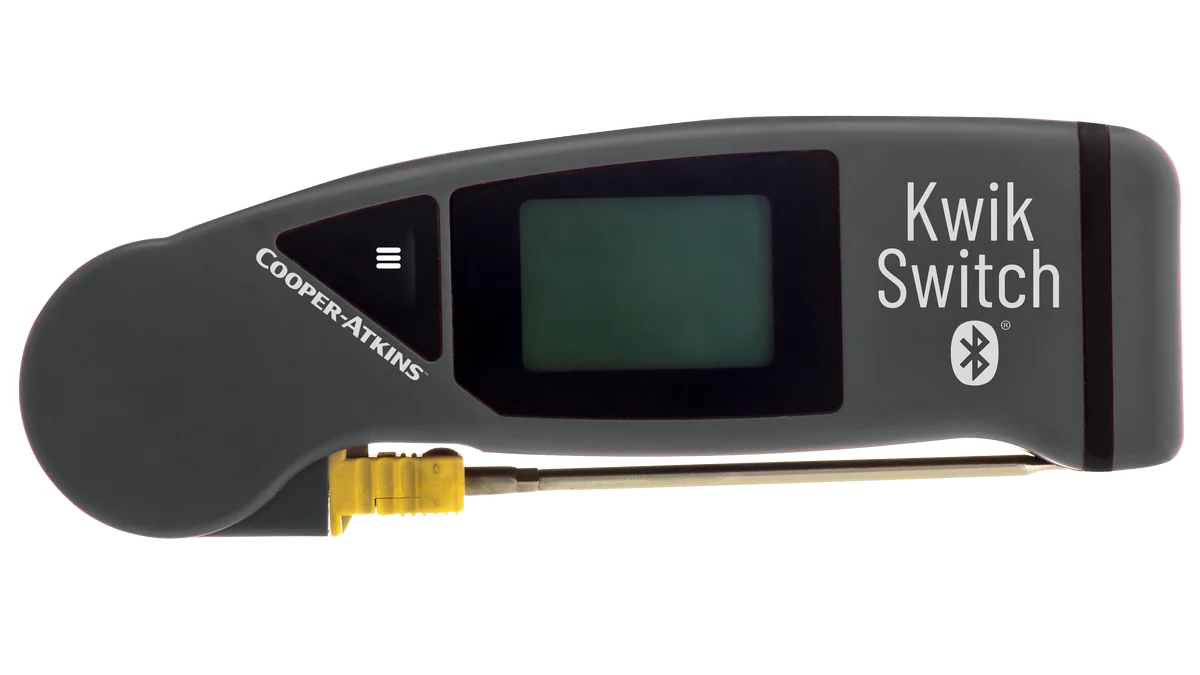
KwikSwitch BLE 94100-B
Folding thermocouple probe with Bluetooth. Fits in a pocket and pairs with the app.
Restaurants
MaintainIQ is restaurant operations software for the work that happens before the doors open and after the last ticket. Opening and closing checklists, line checks, temperature logs and kitchen repairs run on the phones and tablets your crew already uses, and you can see what got done at every location.
Operators at these brands use MaintainIQ
The morning and lunch readings are written in all at once, in the same pen, right before the manager leaves. Nobody knows what the walk-in really read at 11.
One closer filters the fryer oil and seals the walk-in. Another leaves the prep cooler open and the back door propped. You find out at 6 AM.
The ice machine has been acting up for two weeks and three people have mentioned it. Nobody called the vendor, and it quits on a Friday night.
The inspector asks for last week's temperature records and the binder is missing pages. You cannot be sure your other locations look any better.
Opening, closing and line checks
Build your opening, mid-shift, closing and line check lists once and use them at every location. Set a due time like "by 10:30 AM" or an hourly check, and each location shows when it was last completed and who submitted it. See how digital checklists work.
Food safety
Cooks record cooler, freezer and hot-holding temperatures in the app during the check. With a supported Bluetooth probe from Cooper-Atkins (Copeland), the reading is captured and time-stamped, so nobody writes it down or retypes it. A reading out of range becomes a follow-up task with a due date.
Temperature probes
Pair a supported handheld Bluetooth probe with the phone or tablet, and each reading is recorded in the temperature log with who took it and when.
Cooper-Atkins (Copeland)
Folding thermocouple probe with Bluetooth. Fits in a pocket and pairs with the app.
Cooper-Atkins (Copeland)
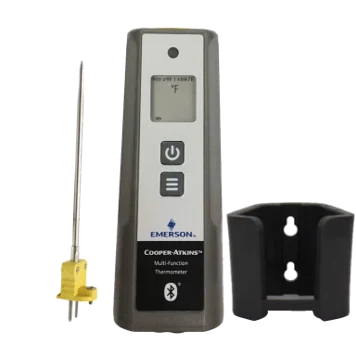
Handheld Bluetooth thermometer, shown with its probe and wall holder.
Available from most online sellers.
Kitchen equipment
Put each piece of kitchen equipment on a preventive maintenance schedule, from hood cleaning every three months to the grease trap every month. When something breaks, the crew reports it from a phone, the right person accepts the work order and the equipment keeps its full repair history.
Multi-unit view
Owners, franchisees and area managers see food safety checks, daily tasks, preventive maintenance and work orders for each restaurant side by side. Group locations by region or brand and get a daily summary email with every location's checklist score.
Examples of checklists and schedules restaurant teams build. You choose the items, the due times and the locations.
Straight answer
MaintainIQ is not a POS, a scheduling app or an inventory system. It does not build staff schedules, count stock or cost out recipes. It covers the daily checks, food safety records, audits and repairs that those tools leave to clipboards and group texts.
Free templates
Free restaurant opening and closing checklists PDF covering front of house, bar, kitchen, restrooms and manager duties, so every shift runs the same way.
A free restaurant health inspection checklist PDF covering food storage, handwashing, cleaning, equipment, pests, records and a final walkthrough.
Free restaurant preventive maintenance checklists (PDF) with daily, weekly, monthly, quarterly and annual tasks for kitchen equipment and the building.
It is software for the daily work that keeps a restaurant running, like opening and closing checklists, line checks, temperature logs, cleaning and repairs. Instead of clipboards and group texts, the crew completes tasks in an app and managers see what was done, when and by whom.
Yes. MaintainIQ is priced per location with unlimited users, so an independent restaurant gets the same features as a group with dozens of units. Every cook, server and manager can have a login at no extra cost. See pricing for current plans.
Yes. The Home dashboard shows food safety checks, daily tasks, preventive maintenance and work orders for every location, and a group filter lets you view locations by region or brand. Daily summary emails put every location's checklist scores in one email.
MaintainIQ works with the Cooper-Atkins/Copeland KwikSwitch BLE 94100-B and the Cooper-Atkins/Copeland Multi-Function Thermometer. These are handheld probes your team uses during a check, and the reading is captured and time-stamped in the app.
Yes. Each person can switch the app between English and Spanish. The app runs on iPhone, iPad, Android phones and tablets, and on the web, so a shared kitchen tablet works too.
No. MaintainIQ does not take orders, build staff schedules or track inventory. It covers checklists, food safety records, audits and maintenance, the parts of the day those systems usually leave to paper. You keep your POS and scheduling tools and use MaintainIQ for the rest.
Ready when you are
By MaintainIQ's own measurements, managers save 3-10 hours a week. In a 15-minute demo we will show you how your opening checklist, temp logs and kitchen repairs would work across your locations.
Prefer to talk? Call (888) 534-0261. US-based support.