Cooper-Atkins (Copeland)
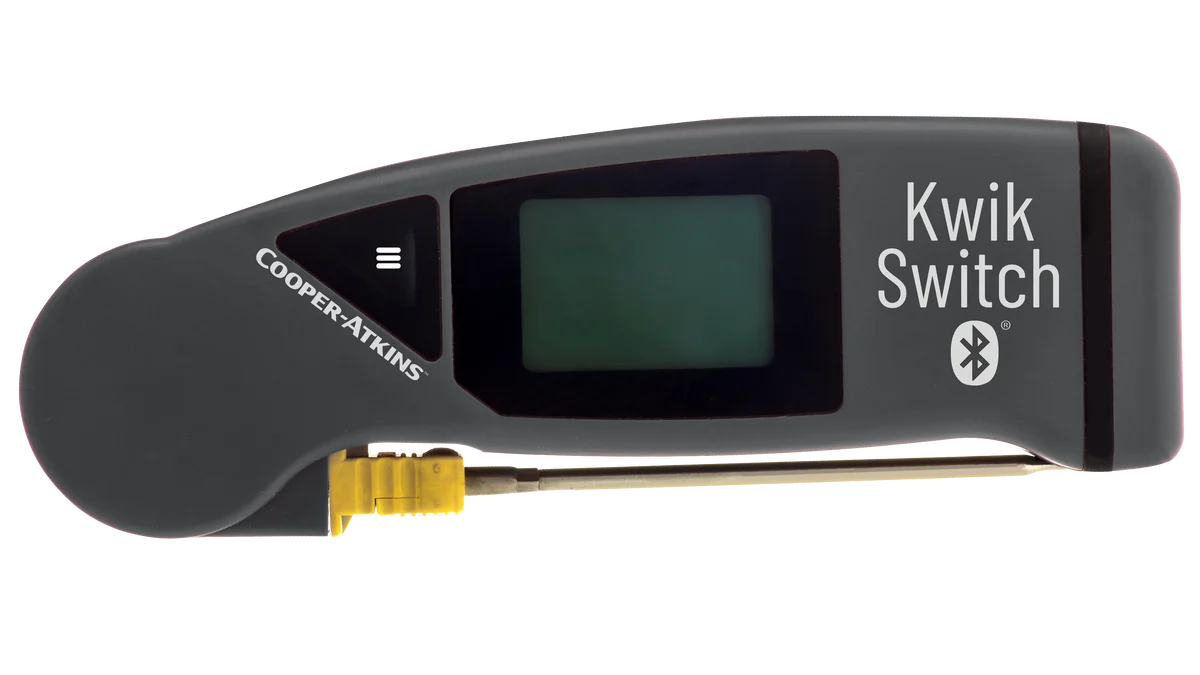
KwikSwitch BLE 94100-B
Folding thermocouple probe with Bluetooth. Fits in a pocket and pairs with the app.
Compliance
MaintainIQ is compliance software for restaurants and multi-location operators who want to be ready for the health inspector every day, not just the night before. Temp logs, cleaning logs and safety checks are done in the app and saved with who did them and when, and each location's last health inspection is on one screen.
Operators at these brands use MaintainIQ
Records
An inspector does not want to hear that the cooler is always checked. They want to see it. Every checklist in MaintainIQ is saved with the name of the person who submitted it and the time, and every work order keeps a history of who reported it, who accepted it and who closed it. When the inspector asks for last month's temp logs, a manager can view or export the records for that date range.
Food safety
Cold holding, hot holding and cooling checks run as temp logs, and readings from a supported Bluetooth probe are captured and time-stamped. Cleaning logs for restrooms, prep areas, the ice machine and floors run with the same due times at every location, so the closing crew at one store does what the closing crew at another does.
Temperature probes
Pair a supported handheld Bluetooth probe with the phone or tablet, and each reading is recorded in the temperature log with who took it and when.
Cooper-Atkins (Copeland)
Folding thermocouple probe with Bluetooth. Fits in a pocket and pairs with the app.
Cooper-Atkins (Copeland)
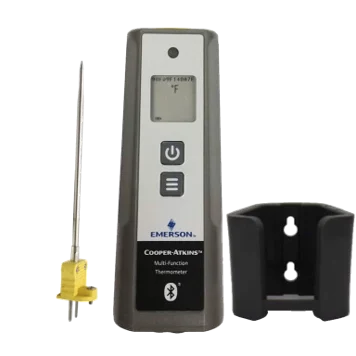
Handheld Bluetooth thermometer, shown with its probe and wall holder.
Available from most online sellers.
Schedules
Monthly fire extinguisher checks, pest control visits, hood cleaning and grease trap service are easy to forget until an inspector asks about them. Set each one up as a recurring maintenance item with the vendor who does it, see what is due and what is overdue, and record the service when it is done.
Documents
Keep your food safety plan, permits, pest control reports, training files and equipment manuals in the document library, in folders by topic. Share a folder with every location or limit it to one location. When someone asks for a document, you open the app instead of the filing cabinet in the office.
Every location
After each visit, a manager enters the health inspection, and the Compliance tab on the Home screen shows each location's last inspection date, status and score. The dashboard next to it shows food safety checks, daily tasks, maintenance and work orders for every location, so the store that stopped doing its temp logs does not stay hidden for long.
Every day, not the day before
| Item | Paper, binders and memory | MaintainIQ |
|---|---|---|
| Temperature logs | Filled in later or not at all | Saved with a name and a time on every log |
| Cleaning logs | Initials on a sheet by the sink | A checklist submitted by a named person |
| Pest control and fire safety | A sticker on the extinguisher and hoping the vendor calls | A recurring schedule with due dates and service history |
| Documents | In a drawer, if they are up to date | In the document library |
| Last health inspection | Posted on the wall at each location | Entered after each visit, with date, status and score for every location on one screen |
Straight answer
No app can pass an inspection for you, and MaintainIQ does not promise a score. It is not a legal or regulatory certification, and it is not software for IT security or data privacy compliance. It makes the daily work visible, recorded with a name and a time, and followed up when something fails, which is how you stay ready.
Free templates
A free restaurant health inspection checklist PDF covering food storage, handwashing, cleaning, equipment, pests, records and a final walkthrough.
Free pest control inspection checklist PDF for monthly interior and exterior checks, quarterly exclusion audits, sanitation and pest provider records.
Free commercial kitchen hood and exhaust cleaning checklist PDF with daily, weekly and monthly staff tasks, the NFPA 96 schedule and records to keep.
It is software that helps you do and record the daily work that health and safety rules call for. Temperature logs, cleaning logs, safety checks and documents live in one app, each saved with who did it and when, so you are ready for an inspection on any day, not only the day you expect one.
It helps you get ready, but no software can promise a passing score. MaintainIQ makes sure daily checks are done, recorded with a name and a time, and followed up when something fails. Many common health code violations, like food held at the wrong temperature, are the kind daily checks catch.
It depends on your state and county, but inspectors often ask for temperature and cooling logs, cleaning records, pest control reports and your food safety plan. Keeping them in MaintainIQ means you can show them from a phone or tablet, or export the records for any date range, instead of searching the office for a binder.
Yes. A manager enters each health inspection after the visit, and the Compliance tab on the Home screen shows each location's last inspection date, status and score, next to the Audits and Performance tabs. Owners and area managers can see at a glance which locations have had a rough inspection lately and need attention before the next one.
Yes. MaintainIQ comes with more than 50 ready templates built around common rules, including the FDA Food Code, NFPA 10, 25 and 96, ASME A17.1, OSHA, ASHRAE 188, EPA 608, CMS, USDA NSLP and ASTM F2970. They give you a starting point built around the rules. They are not a certification, and your local inspector still decides what passes.
Start with what your health inspector checks, then compare the options on how easy they are for staff on shift, how far you can change the checklists, support and total cost for all your locations. Our guide on how to choose restaurant compliance software walks through each point.
No. MaintainIQ is a tool for doing and recording the work your local rules call for, not a certification, and using it does not make a location compliant on its own. Your health department decides which records you need to keep and for how long.
Yes. Any operation with daily checks, food service and building upkeep can use it, including grocery and convenience stores, hotels, parks and senior living communities. See industries for how MaintainIQ fits each one, and what it is not built to replace, like a hotel reservation system.
Ready when you are
In a 15-minute demo we will show you how logs, schedules and inspection history would work at your locations.
Prefer to talk? Call (888) 534-0261. US-based support.