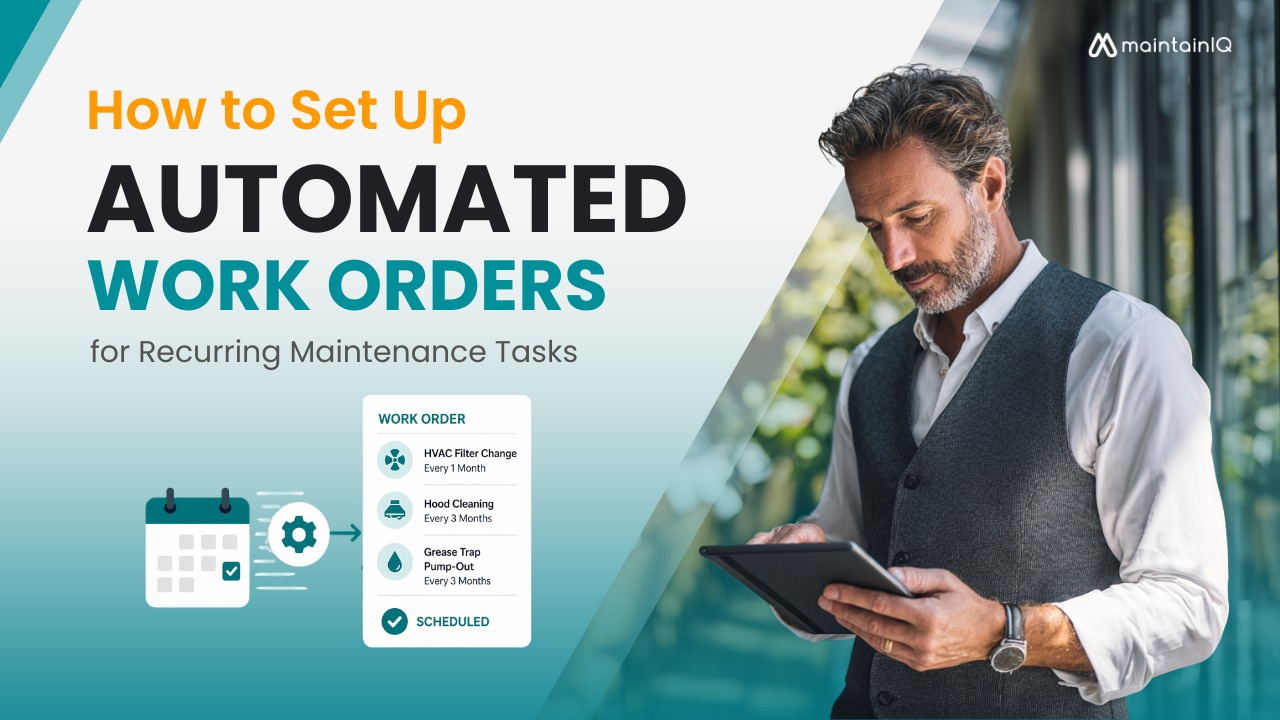
Every restaurant, hotel, and facility has dozens of maintenance tasks that need to happen on a fixed schedule — hood cleanings, HVAC filter changes, grease trap pump-outs, fire suppression inspections, refrigeration coil cleanings. These aren’t optional. Many are required by code, and skipping them leads to equipment failure, health violations, and emergency repair bills that cost two to five times more than scheduled service.
The problem is that most operators track these tasks with spreadsheets, calendars, or memory. A manager remembers the quarterly hood cleaning is due — until they don’t. A technician finishes a repair, but nobody logs it, so the next work order gets created for a job that’s already done. Across multiple locations, these gaps multiply fast.
Automated work orders solve this by generating maintenance tasks on a set schedule without anyone having to remember, create, or assign them manually. The system does it. The right person gets notified. The task gets tracked to completion. And if it doesn’t get done, management knows about it.
This article walks through exactly how to set up automated work orders for recurring maintenance — from identifying what needs to be scheduled, to setting the right frequencies, to building a system that runs across every location without constant oversight.
Table of Contents
Why Recurring Maintenance Breaks Down Without Automation
Before building the system, it’s worth understanding why manual scheduling fails — even when operators know exactly what needs to be done.
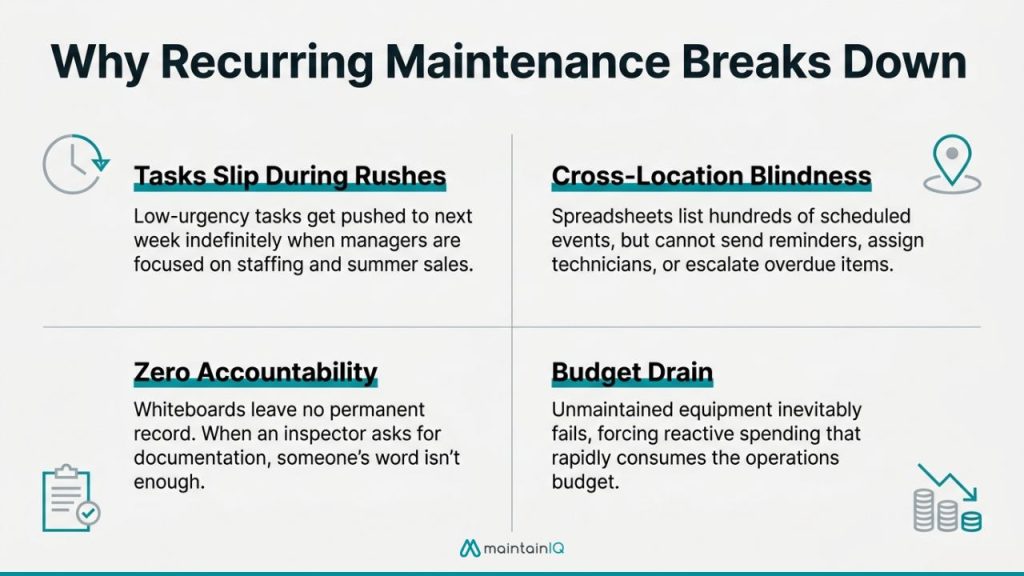
Tasks slip during busy periods. A quarterly condenser coil cleaning is easy to remember in January. It’s easy to forget during a summer rush when every manager is focused on staffing and sales. Without an automated trigger, low-urgency but high-importance tasks get pushed to “next week” indefinitely.
Tracking across locations is nearly impossible manually. If you operate ten locations, each with 15–20 recurring maintenance tasks at different frequencies, you’re managing 150–200 scheduled events across the year. A spreadsheet can list them. It can’t send reminders, assign technicians, track completion, or escalate overdue items.
There’s no accountability trail. When a work order lives on a whiteboard or in a manager’s notebook, there’s no record of when it was created, who was assigned, when it was completed, or what was found. If a health inspector or fire marshal asks for documentation of your last hood cleaning or fire suppression test, you need more than someone’s word.
Emergency repairs consume the budget. According to the U.S. Department of Energy, preventive maintenance reduces overall maintenance costs by 12–18% compared to reactive approaches. Industry data shows that emergency repairs cost two to three times more than scheduled service, before accounting for lost revenue during equipment downtime. Every recurring task that gets missed is a future emergency repair waiting to happen.
The purpose of automation isn’t to add complexity. It’s to remove the human bottleneck from a process that needs to happen consistently, on time, and with documentation — regardless of how busy the operation gets.
Step 1: Identify Every Recurring Maintenance Task
The first step is building a complete inventory of every task that needs to happen on a schedule. Most operators undercount because they’re thinking about the big items (hood cleaning, HVAC service) and forgetting the smaller ones that still carry compliance or equipment consequences.
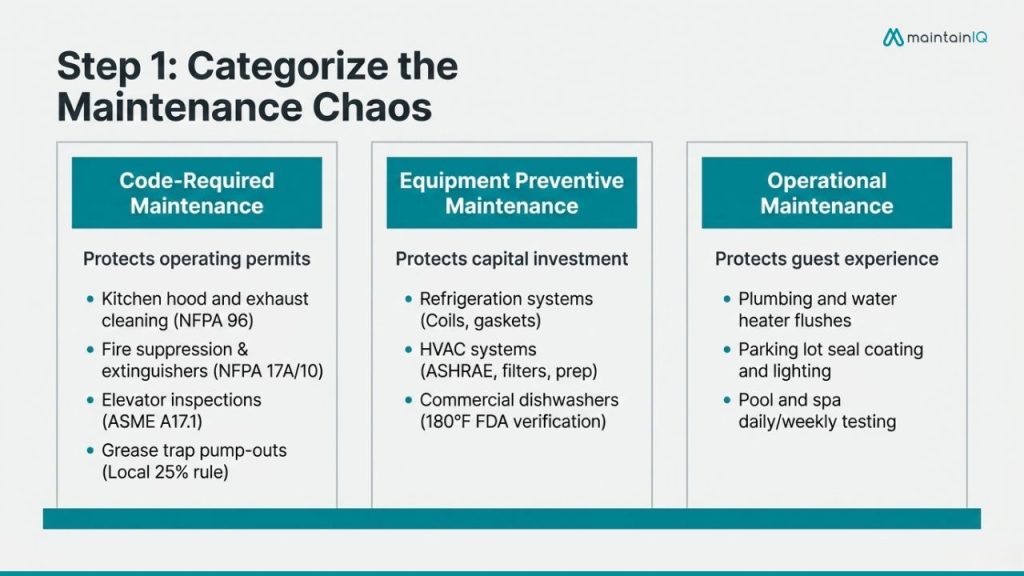
Start by walking through your operation with three categories in mind:
Code-Required Maintenance
These tasks are mandated by regulation, and missing them puts your operating permits at risk.
Kitchen hood and exhaust cleaning is governed by NFPA 96. Frequency depends on cooking volume: quarterly for high-volume operations (24-hour kitchens, charbroiling, wok cooking), semi-annually for moderate-volume operations, and annually for low-volume operations. This requires a certified cleaning company, and documentation must be kept on file for fire marshal inspections.
Fire suppression system inspection requires monthly visual checks of nozzle caps, gauges, and physical condition, plus semi-annual testing of gas and electric shutoffs and a full professional service annually per NFPA 17A.
Fire extinguisher maintenance includes monthly visual inspections (in-house), annual professional maintenance, six-year internal examination, and twelve-year hydrostatic testing per NFPA 10.
Grease trap cleaning frequency depends on your local jurisdiction and the 25% rule — the trap must be cleaned before fats, oils, and grease accumulate past 25% of capacity. Most operations schedule pump-outs monthly or quarterly.
Elevator inspection follows ASME A17.1 and typically requires annual certified inspection plus monthly or quarterly in-house checks.
Equipment Preventive Maintenance
These tasks protect your capital investment and prevent the emergency breakdowns that shut down service.
Refrigeration systems — walk-in coolers, reach-in refrigerators, and freezers — need condenser coil cleaning quarterly, door gasket inspection monthly, and professional compressor service annually.
HVAC systems need filter changes monthly, coil cleaning quarterly, and full professional service twice a year (spring cooling prep, fall heating prep). ASHRAE guidelines apply to facilities with specific air quality requirements like senior living and healthcare.
Commercial dishwashers need daily rinse arm and drain cleaning, weekly deliming, and quarterly professional service to verify final rinse temperatures meet FDA Food Code requirements (180°F for high-temp machines).
Ice machines need quarterly professional cleaning and sanitization beyond daily wipe-downs. Ice machine violations are among the most common health inspection citations.
Operational Maintenance
These tasks maintain facility quality and guest experience.
Plumbing and water heaters — flush water heaters annually, inspect supply lines quarterly, and test backflow prevention devices annually per local code.
Parking lots and exterior — seal coating, striping, and lighting inspection on annual or semi-annual schedules.
Pool and spa equipment (hotels, senior living) — daily chemical testing, weekly filter backwash, and monthly professional service.
The specific list will vary by operation type. A hotel’s recurring tasks look different from a grocery store’s. The point is to capture everything — then assign frequencies.
Step 2: Set the Right Frequencies
Not every task runs on the same interval. Setting frequencies too high wastes labor and vendor costs. Setting them too low defeats the purpose of preventive maintenance.
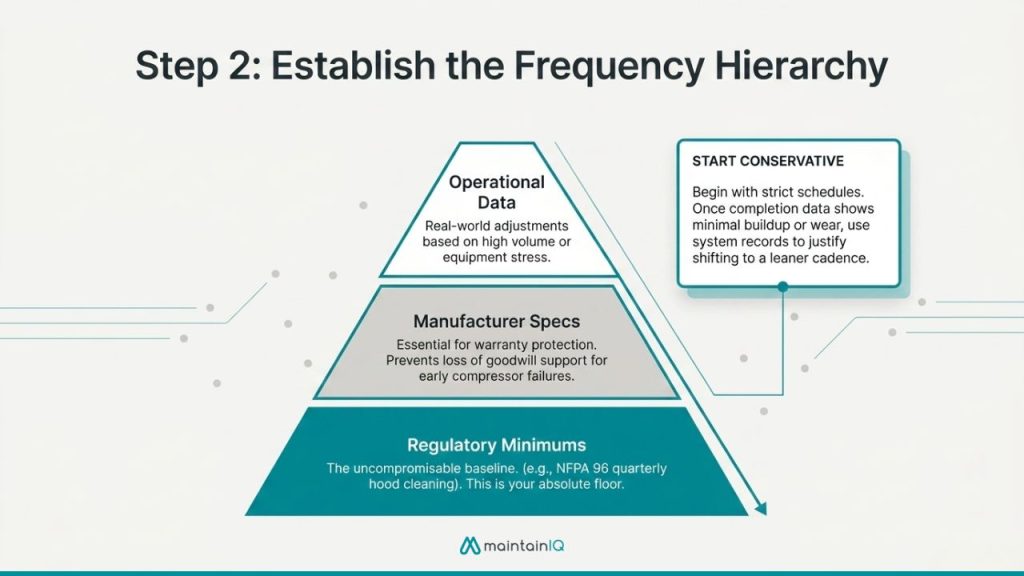
Use this hierarchy to determine the right cadence for each task:
Regulatory minimums come first. If NFPA 96 requires quarterly hood cleaning for your operation type, that’s the floor — not the ceiling. The same applies to fire extinguisher inspections (NFPA 10), elevator certifications (ASME A17.1), and backflow preventer testing (local code).
Manufacturer recommendations come second. Every piece of commercial equipment ships with a recommended maintenance schedule. Use it. When the compressor on a walk-in cooler fails six months out of warranty, and you have no service records, the manufacturer has no reason to offer goodwill support.
Operational experience fills in the gaps. A fryer in a high-volume fried chicken operation needs more frequent oil filtration and boil-outs than one in a café that runs it twice a week. Your equipment maintenance history tells you which assets need more attention than the manufacturer’s baseline suggests.
When in doubt, start conservative and adjust. It’s better to schedule a quarterly task that turns out to need only semi-annual attention than to skip six months and discover a failed compressor. Once you have data from completed work orders — time to complete, issues found, parts replaced — you can optimize frequencies based on actual performance rather than guesswork.
Step 3: Build the Work Order Templates
Each recurring task needs a standardized work order template that includes everything the assignee needs to complete the job correctly and document the result.
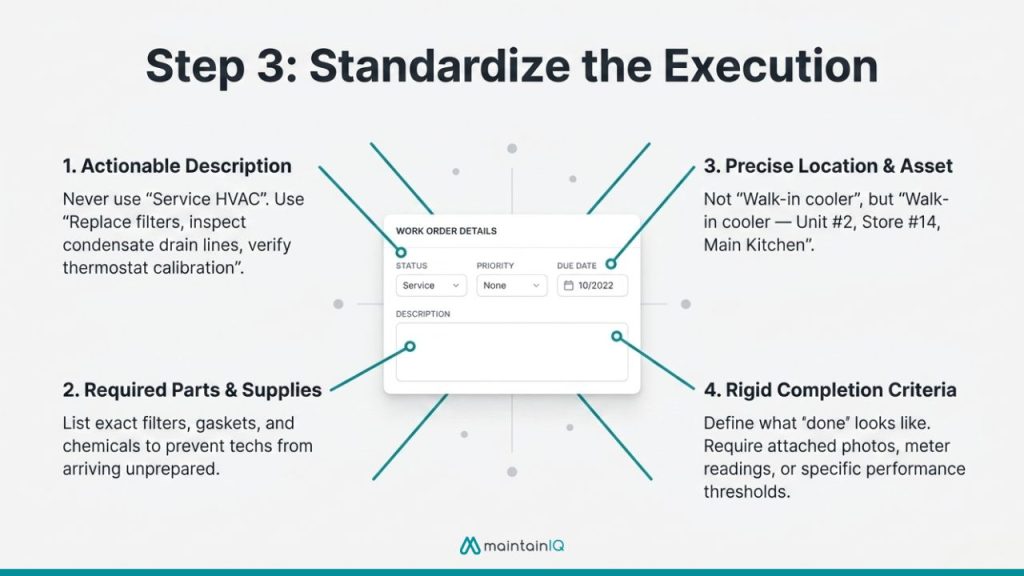
A good template includes:
Task description — what specifically needs to be done, written clearly enough that any qualified person can execute it. “Service HVAC” is not a work order. “Replace HVAC air filters (all units), inspect condensate drain lines, verify thermostat calibration, and check refrigerant levels” is.
Location and asset — which specific piece of equipment at which specific location. For multi-location operators, “walk-in cooler” is ambiguous. “Walk-in cooler — Unit #2, Store #14, Main Kitchen” is actionable.
Estimated duration — helps managers plan labor allocation and helps technicians manage their schedule.
Required parts or supplies — listing filters, gaskets, cleaning chemicals, or other materials in the template prevents the technician from showing up unprepared and rescheduling the job.
Completion criteria — what “done” looks like. For a condenser coil cleaning, that might include “coils visibly clean, no debris obstruction, fan running freely, discharge temp within 10°F of nameplate.” This prevents sign-offs on half-finished work.
Documentation requirements — photos, temperature readings, meter readings, or any other evidence needed for compliance records. Digital work order systems let technicians attach photos and notes directly to the work order, creating a permanent record.
Build these templates once. Every time the automated system generates the work order, it uses the same template — ensuring consistency regardless of which technician or location is involved.
Step 4: Set Up the Automation
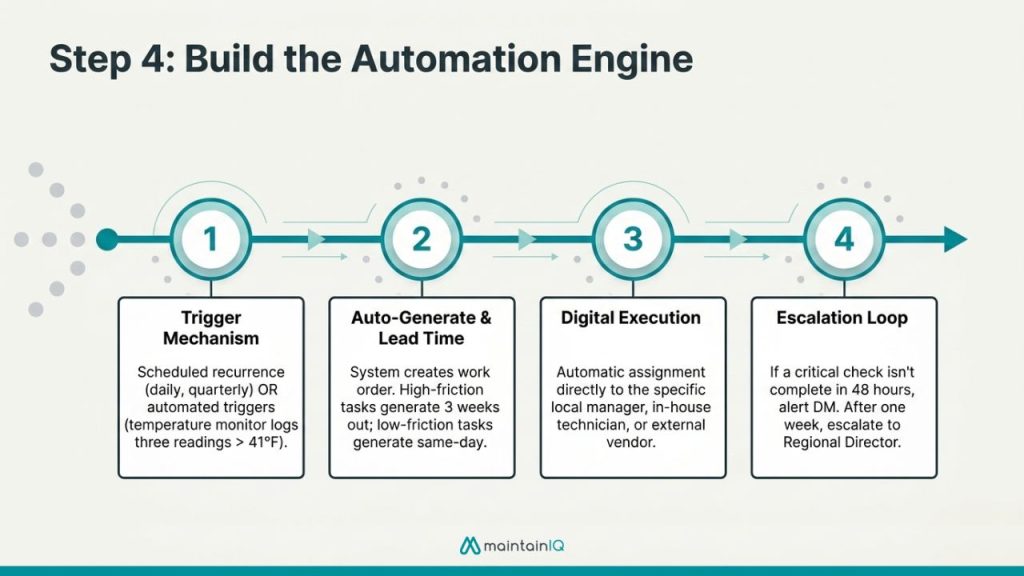
This is where the system takes over. Once your tasks, frequencies, and templates are defined, configure the automation so that work orders generate and assign themselves without manual intervention.
Configure recurring schedules
Each task gets a recurrence rule: daily, weekly, monthly, quarterly, semi-annually, or annually. Some systems also support custom intervals (every 90 days, every 6,000 operating hours, etc.).
For each schedule, define:
Start date — when the first work order should generate. For existing equipment, use the date of the last completed service as your anchor. For new equipment, use the installation date.
Lead time — how far in advance the work order should appear. A quarterly hood cleaning that requires a vendor booking should generate 2–3 weeks ahead. A monthly filter change that takes 15 minutes can generate the day it’s due.
Assignment rules — who receives the work order. For in-house tasks, assign to the location manager or maintenance tech. For vendor-required tasks, assign to the manager responsible for coordinating the vendor visit and verifying completion.
Set up escalation for overdue tasks
Automation only works if there are consequences for non-completion. Configure escalation rules so that overdue work orders notify the next level of management. If a monthly fire extinguisher inspection isn’t marked complete within 48 hours of the due date, the district manager gets an alert. If it’s still open after a week, it escalates to the regional or operations director.
This is particularly important for multi-location operators. Without escalation, an overdue task at one location can sit unnoticed for weeks — until a fire marshal asks for the inspection log. Corporate-level reporting gives operations leaders visibility into overdue work orders across every location without needing to call each store.
Connect work orders to your broader maintenance program
Automated work orders shouldn’t exist in isolation. They’re one component of a connected system.
Preventive maintenance schedules feed the work order queue. When a PM task comes due, the system generates the work order automatically.
Digital checklists can trigger work orders. If a daily opening checklist reveals that a cooler is running warm, the operator can create a corrective work order on the spot — linked to the checklist entry that identified the problem.
Temperature monitoring can trigger work orders automatically. If a walk-in cooler logs three consecutive readings above 41°F, the system generates a maintenance request without anyone having to notice or report it.
This connected approach turns your maintenance program from a collection of isolated tasks into an integrated system where problems are detected, documented, assigned, and resolved through a single workflow.
Step 5: Roll It Out Across Every Location
For single-location operators, the setup above is straightforward. For multi-location operators, the rollout requires standardization.
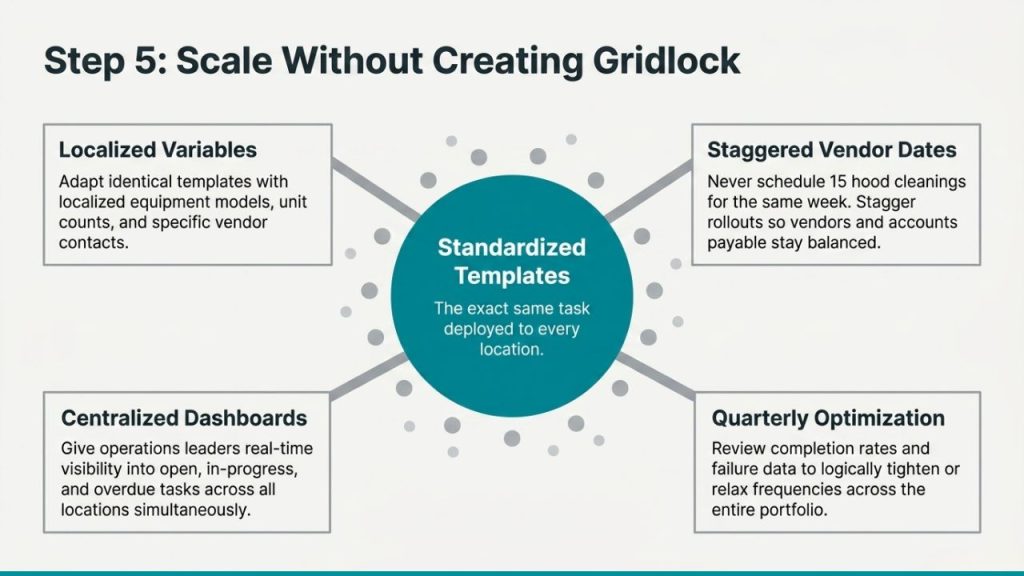
Use the same templates across all locations. The work order for “quarterly condenser coil cleaning” should look identical at every store. Standardized templates ensure consistent execution and make it possible to compare completion rates and findings across locations.
Account for location-specific variables. While templates stay consistent, some details change by location: equipment make and model, vendor contacts, unit counts, and access instructions. Build these as location-specific fields within the standard template.
Stagger vendor-dependent tasks. If you have 15 locations that all need quarterly hood cleaning, don’t schedule all 15 for the same week. Stagger them across the quarter so your vendor can service each location on schedule and your accounts payable team isn’t processing 15 invoices simultaneously.
Establish a single dashboard for visibility. Operations leaders need to see, at a glance, which locations are current on all recurring tasks and which have overdue work orders. MaintainIQ’s work order management provides this through a centralized view where every location’s open, in-progress, and completed work orders are visible in real time.
Review and adjust quarterly. After one full cycle, pull data on completion rates, average time to complete, tasks that frequently generate follow-up repairs, and tasks that consistently find no issues. Use this data to tighten or relax frequencies. If quarterly condenser coil cleanings consistently show minimal buildup, you may be able to shift to semi-annual. If monthly gasket inspections keep finding failures, the equipment may need replacement rather than ongoing repair.
Common Recurring Maintenance Tasks by Industry
Different operation types have different task profiles. Here’s a reference for the core recurring tasks by vertical — each of which should have an automated work order in your system.
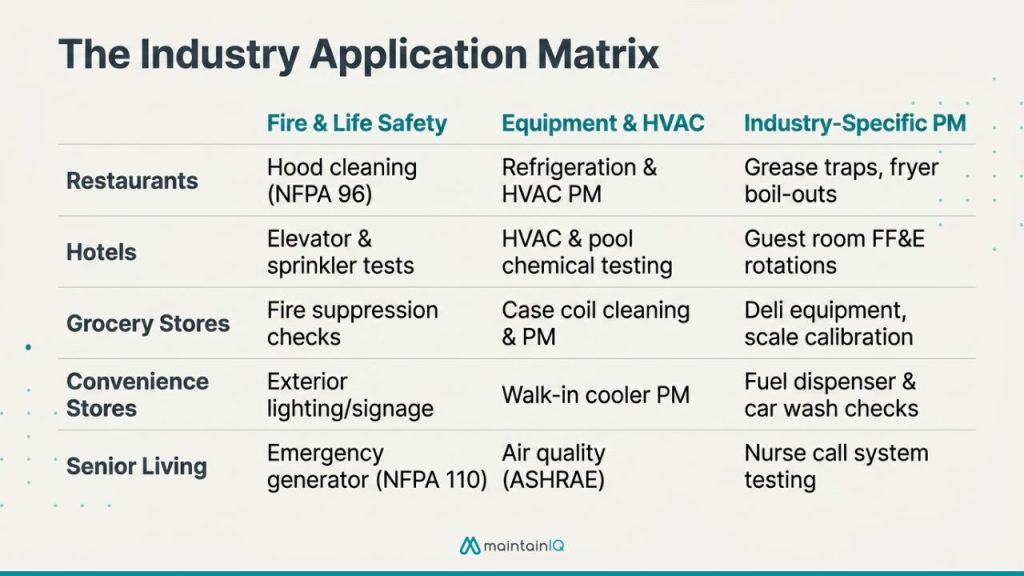
- Hood & exhaust cleaning — Monthly / semi-annual/annual (NFPA 96 schedule)
- Fire suppression inspection — Semi-annual
- Grease trap pump-out — Monthly or quarterly
- Refrigeration coil cleaning — Quarterly
- HVAC filter change — Monthly
- Dishwasher deliming — Weekly
- Deep fryer boil-out — Weekly to monthly
- Ice machine sanitization — Quarterly
- Plumbing inspection — Quarterly
- Pest control service — Monthly
- HVAC system service — Monthly filters, semi-annual professional
- Elevator inspection — Monthly in-house, annual certified (per ASME)
- Pool & spa equipment service — Weekly to monthly
- Guest room FF&E inspection — Quarterly rotation
- Laundry equipment maintenance — Monthly
- Fire alarm & sprinkler testing (NFPA 25) — Quarterly
- Water heater flush — Semi-annual
- Exterior & parking maintenance — Semi-annual
- Refrigeration case cleaning — Weekly (coils quarterly, professional service quarterly)
- HVAC service — Monthly to quarterly
- Deli & bakery equipment PM — Weekly and quarterly
- Floor scrubber & cleaning equipment maintenance — Monthly
- Loading dock equipment inspection — Quarterly
- Pest control — Monthly
- Scale calibration — Semi-annual
- Fuel dispenser inspection — Monthly
- Walk-in cooler & beverage cooler service — Monthly
- HVAC filter change — Monthly
- Fountain equipment cleaning — Weekly
- Exterior lighting & signage inspection — Monthly
- Parking lot & car wash equipment maintenance — Semi-annual
- HVAC & air quality monitoring (per ASHRAE) — Monthly
- Elevator inspection (per ASME) — Monthly or annual
- Medical equipment PM — Per manufacturer schedule
- Fire alarm & suppression testing (per NFPA) — Quarterly
- Kitchen equipment service — Same schedule as restaurants
- Emergency generator testing (NFPA 110) — Monthly
- Nurse call system testing — Quarterly
Getting Started
You don’t need to automate everything on day one. Start with the tasks that carry the highest risk if missed: code-required inspections, critical equipment PM, and any task tied to health or fire code compliance. Get those running first. Then expand to operational and facility maintenance in the following weeks.
Map your tasks. Set your frequencies. Build your templates. Turn on the automation. Then let the system do what manual tracking never could — make sure every task, at every location, gets done on time and gets documented.
MaintainIQ’s work order management and preventive maintenance scheduling let you set up recurring automated work orders, assign them to the right people, track completion in real time, and see everything across every location from one dashboard.
Book a 20-minute demo to see how it works.
Conclusion
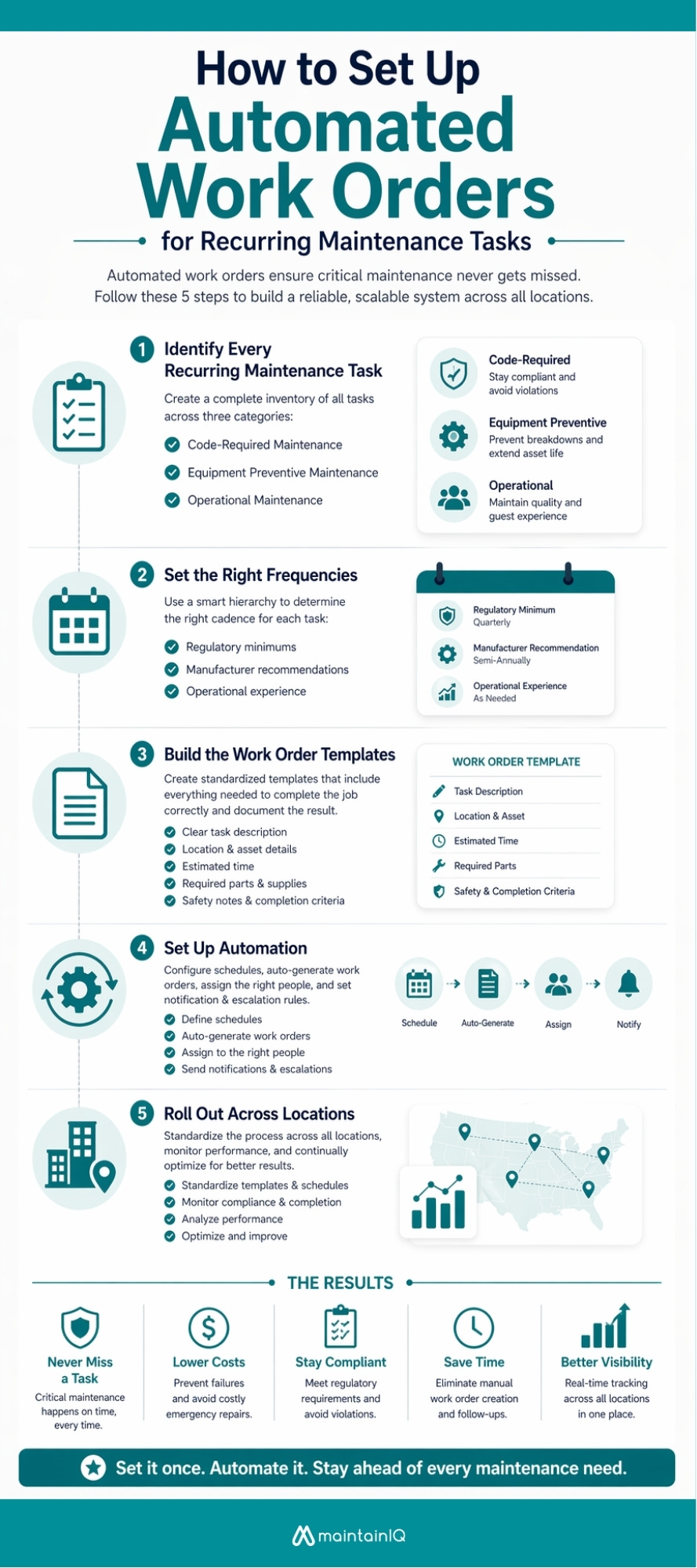
Recurring maintenance tasks are predictable. Equipment needs service on a schedule. Codes require inspections at defined intervals. None of this should depend on someone’s memory or a spreadsheet that nobody updates.
Automated work orders turn predictable tasks into a system that runs itself — generating assignments, notifying the right people, tracking completion, and escalating when something falls behind. For multi-location operators, this is the difference between hoping every location stays compliant and knowing they do.
The maintenance schedule doesn’t change based on how busy your operation gets. Your system for managing it shouldn’t either.