A walk-in cooler compressor fails at one of your locations. The service tech quotes $1,800 for the repair, and you approve it — the alternative is a night of spoiled inventory. Three weeks later, someone finds the original invoice in a filing cabinet: that unit was four years old, and the manufacturer covered the compressor for five. You just paid $1,800 for a repair that should have been free.
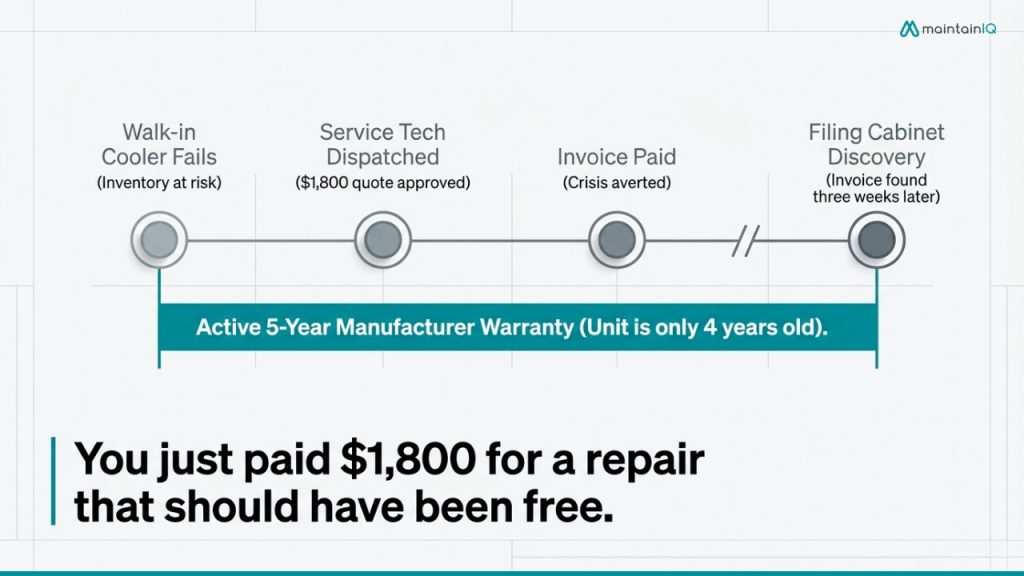
This happens constantly, and it rarely shows up as anything anyone notices. The money is spent, the cooler is running again, and nobody connects the dots. Multiply it across dozens of units, several locations, and a rotating list of service vendors, and a quiet leak turns into real money.
The tool most operators use to prevent this — a spreadsheet — is a big part of why it keeps happening.
Table of Contents
The two things that quietly cost you money
Two separate problems hide inside every multi-location maintenance operation, and both get worse as you add sites.
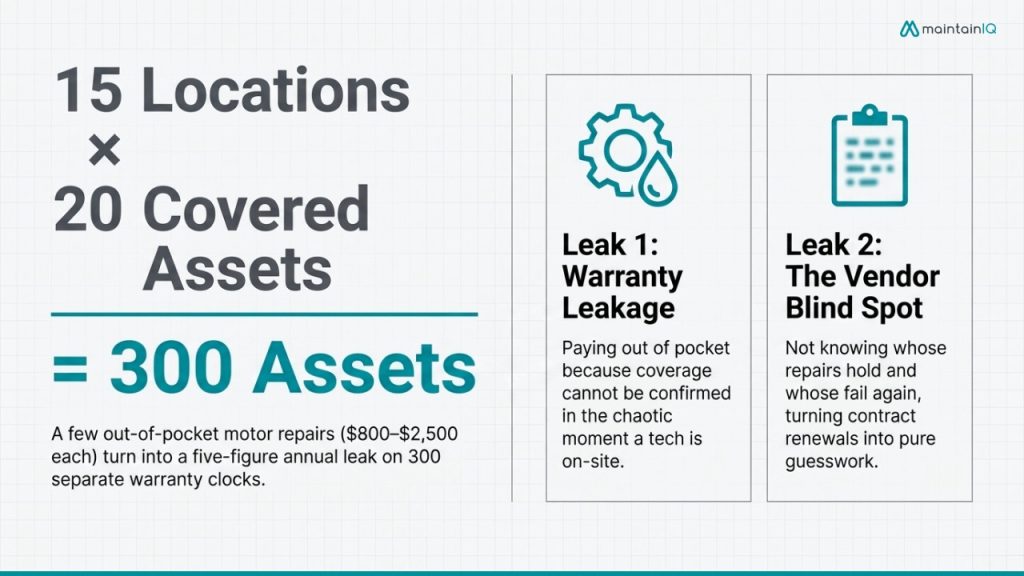
The first is warranty leakage: paying out of pocket for repairs still under coverage. It happens because, at the moment a decision has to be made — a tech on-site, equipment down, service on the line — no one can quickly confirm whether the unit is covered, what the warranty includes, or whether the paperwork is in order. So you approve the charge to keep the location running.
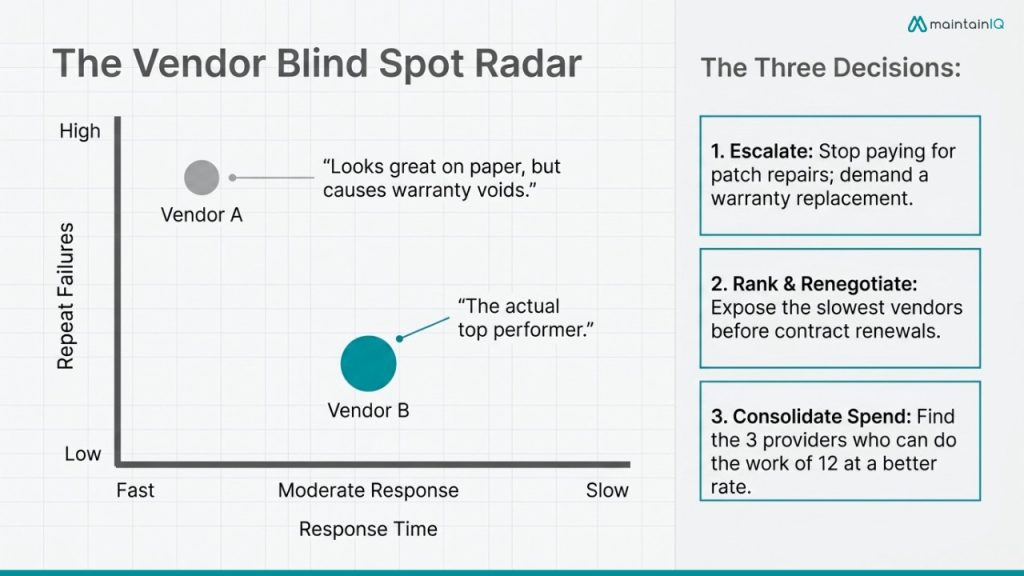
The second is the vendor blind spot: not knowing which service providers are actually performing. Which vendor responds in two hours, and which takes two days? Whose repairs hold, and whose fail again a month later? Are the quarterly maintenance visits you’re paying for actually happening? Without that data, contract renewals become guesswork, and your best-performing vendors look the same on paper as your worst.
Neither problem announces itself. Take a 15-location operator with, conservatively, 20 pieces of covered equipment per site — that’s 300 assets, each on its own warranty clock, serviced by a handful of regional vendors. If even a few compressor, control-board, or motor repairs a year get paid out of pocket while still under coverage — each easily $800 to $2,500 with labor — the annual leak runs into five figures, before you count the slow vendors nobody flagged and the units repaired three times when a warranty claim would have replaced them. None of it shows up on a report, which is exactly why it persists.
Why can’t spreadsheets do this job
Start with the obvious: spreadsheets are error-prone. Research from the University of Hawaii found that up to 88% of spreadsheets contain errors, averaging roughly one error for every 20 cells of data — and manual reviews catch only about half of them. Error rates on manual data entry climb to 18–40% of fields once volume and complexity go up, which is exactly the condition a multi-location equipment log creates.
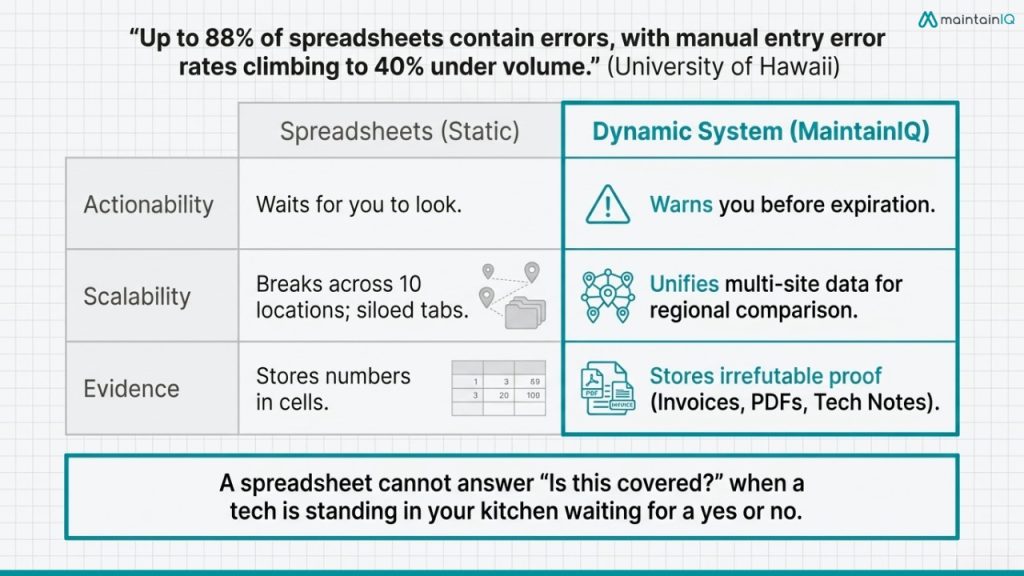
But accuracy isn’t even the main problem. Three structural failures make a spreadsheet the wrong tool for this specific job:
- It never tells you anything. A spreadsheet waits. It won’t warn you that a warranty expires in 30 days or that a contracted vendor missed a scheduled visit. You only learn the answer when you go looking — usually after the repair is already done and paid for.
- It falls apart across locations. Ten sites means ten versions, or one shared file that three people are editing at once. The regional comparison you actually need — which vendor is slowest, which asset fails most — is impossible when the data lives in separate tabs and inboxes.
- It stores numbers, not proof. A warranty claim needs the model number, serial number, install date, and proof of purchase — plus service records showing the equipment was maintained. A spreadsheet cell can’t hold the invoice, the registration confirmation, or the technician’s report. When those live somewhere else, they’re gone when you need them.
What warranty tracking actually requires
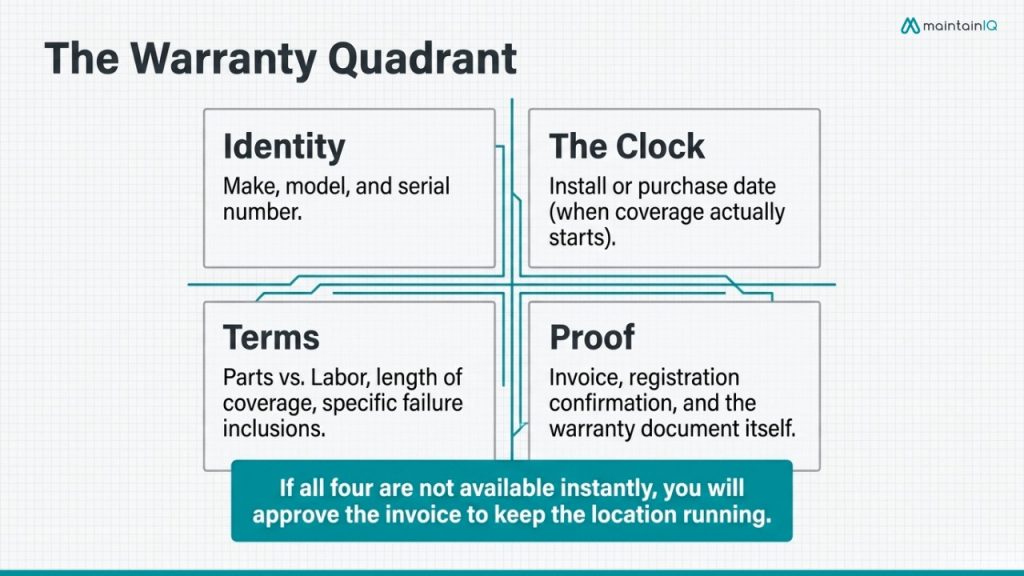
To answer “is this covered?” before you approve a repair, you need four things about every piece of equipment, available on demand:
The reason this matters is that commercial equipment warranties are more generous — and more full of traps — than most operators realize. Commercial refrigeration commonly carries one to three years of parts-and-labor coverage plus five to seven years on the compressor. True Refrigeration offers seven years across parts, labor, and compressor; Continental pairs six years parts-and-labor with a seven-year compressor; Turbo Air runs five years parts-and-labor with additional compressor coverage on top. Those are real dollars sitting on your equipment right now.
The trap is that many of those extended terms are parts-only. The compressor may be “covered” for seven years, but labor, refrigerant, and the service call can still land on you. And warranties void easily: an unauthorized technician, a missed registration deadline (some brands require registration within 10 days of install), or a gap in maintenance records can all disqualify an otherwise valid claim.
The authorized-technician rule deserves its own mention. Most manufacturers void coverage the moment a non-authorized tech touches the unit — so the fastest contractor you called at 9 p.m. to save your inventory may have quietly cancelled a warranty you were still counting on. Knowing a unit is covered before you dispatch anyone is what prevents that, and it’s a lookup a spreadsheet can’t do for you in the moment.
And this isn’t only a refrigeration issue. Cooking equipment, dish machines, HVAC units, and water heaters all ship with their own coverage windows, their own parts-versus-labor fine print, and their own registration requirements. The more equipment types and locations you run, the less any single person can keep the terms straight — and the more a covered repair slips through as an approved invoice.
So “is it under warranty?” is really four questions at once: Is the unit still in its coverage window? Is this specific failure covered? Is labor included, or only the part? And can you prove the warranty was kept valid? A spreadsheet answers none of these in the moment you need them — when a tech is standing in your kitchen waiting for a yes or no.
What vendor performance tracking actually requires
Vendor performance isn’t a gut feeling about who you like working with. It’s data you can only build if you capture it consistently on every job:
- Response and resolution time — how long from request to on-site, and from on-site to fixed
- Repeat failures — the same unit breaking down again after a “repair,” or one vendor’s work failing more often than another’s
- Contract compliance — are the scheduled preventive maintenance visits you’re paying for actually happening, on time?
- Cost trends — what you’re spending per vendor, per location, and per asset
At a single location, you might hold most of this in your head. Across ten, you can’t. The vendor who’s slow at your busiest store looks fine on paper because no one is comparing response times side by side. The ice machine that’s been “repaired” four times this year by the same contractor should have been escalated to a warranty replacement — but nobody caught the pattern, because each visit lived on a different sheet, a different tab, or a different manager’s phone.
Once you’re actually capturing that data, it turns into three decisions you couldn’t make before:
- Escalate repeat failures. When one asset shows a pattern of the same fault, that’s a signal to stop paying for patch repairs and pursue a warranty claim or replacement — not to keep dispatching the same fix.
- Rank and renegotiate. With response and resolution times side by side, your slowest vendors are visible before renewal, giving you a factual basis to renegotiate terms or move the work elsewhere.
- Consolidate spend. Seeing cost per vendor across every location often reveals that two or three providers could cover what a dozen do now — usually at a better rate, and with cleaner accountability.
How to track both — without a spreadsheet
The fix isn’t a cleaner spreadsheet. It’s connecting three things spreadsheets keep apart — equipment, warranties, and vendors — and tying all of it to the actual work being done. In practice, that’s five things:
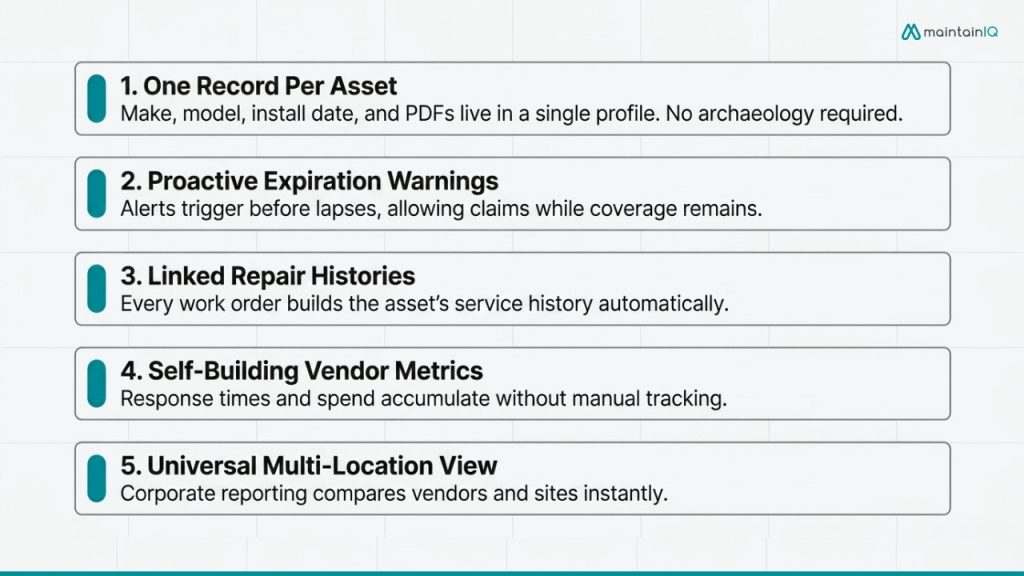
- One record per asset. Every piece of equipment gets a single profile: make, model, serial, install date, warranty terms, and the documents attached — invoice, registration, warranty PDF. When a tech is standing in front of the unit, confirming coverage is one lookup, not an archaeology project. Good equipment maintenance software treats the asset, not a spreadsheet row, as the source of truth.
- Warranty expirations that warn you. Instead of a static date buried in a cell, coverage windows trigger alerts before they lapse — so you know a compressor is still covered before you approve the repair, and you know when an extended warranty is about to end while filing still makes sense.
- Every repair linked to the asset. When a work order is tied to the specific unit, its full service history builds itself. You can see that the ice machine at Store 12 has been serviced three times in six months — your signal to push for a warranty replacement instead of paying for a fourth repair.
- Vendor performance that builds itself. Because every work order records who did the work, how fast they responded, and what it cost, vendor performance data accumulates without anyone maintaining a tracker. Response times, repeat-visit rates, and spend per vendor are simply there when it’s time to renew — or replace — a contract.
- One view across every location. Corporate-level reporting lets a regional or corporate team compare vendors and warranty status across all sites at once — the comparison that’s impossible when each location keeps its own file. Standardized digital checklists and preventive maintenance schedules keep the maintenance record intact, which is exactly the documentation a manufacturer asks for when you file a claim.
What to look for in a system
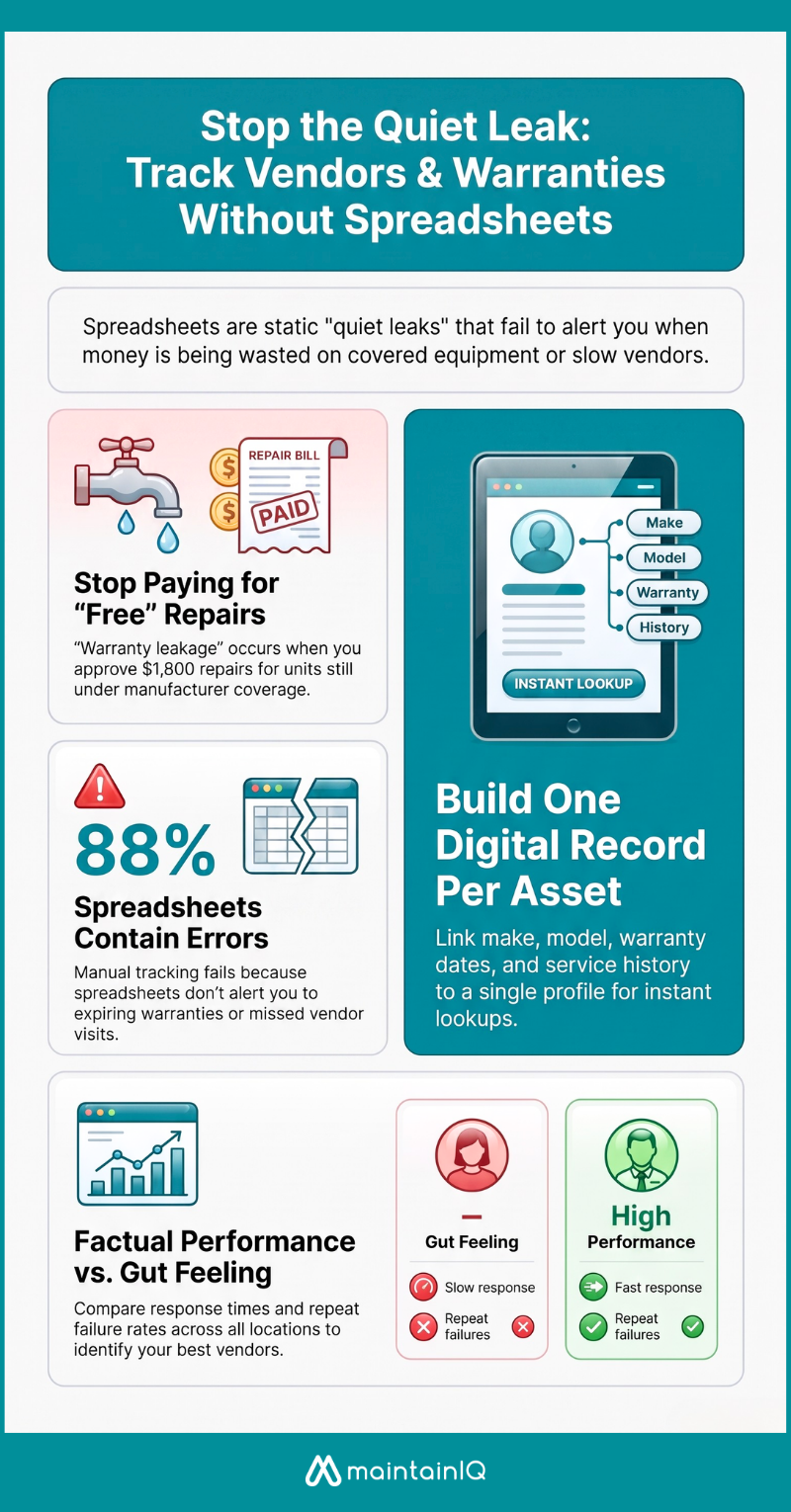
If you’re evaluating a way to replace the spreadsheet, the details that matter aren’t the flashy ones. A system that solves this problem should let you:
- Attach warranty terms, install dates, and source documents directly to each asset — not to a separate list
- Send automatic alerts before a warranty lapses or a contracted vendor visit comes due
- Build a complete service history for every unit from the work orders your team already logs
- Compare vendor response times, repeat-visit rates, and cost across all locations in one place
- Capture photos and technician notes in the field, so the proof a claim requires is already on file
Anything short of that leaves you back where you started: a static record that ages the moment it’s written and can’t tell you what it knows until you go digging.
Bringing it together with MaintainIQ
This is the problem MaintainIQ’s vendor and warranty management is built to solve. Instead of equipment in one place, warranties in a spreadsheet, and vendor contacts in someone’s phone, MaintainIQ keeps them together and connected to the work orders your team already logs. For each location, you can:
- Store vendor contacts, service contracts, and warranty terms against the specific equipment they cover
- Get alerts when a warranty is about to expire or a contracted vendor visit is overdue
- Pull a full service history for any asset, so recurring problems and warranty-eligible failures are obvious
- See it all across every site through corporate-level reporting, so no location’s data lives on an island
Because it ties into work order management and inspection records, the documentation you actually need to win a warranty claim — service dates, maintenance logs, photos — is captured as part of normal operations, not reconstructed after the fact. The result is straightforward: fewer repairs you never should have paid for, and real data on which vendors earn the next contract.
If you’re running maintenance across multiple locations and still tracking vendors and warranties in spreadsheets, it’s worth seeing the alternative. Book a 20-minute demo and we’ll show you how it works for an operation of your size.
Frequently asked questions
Can I store vendor contact information in a maintenance system?
Yes. MaintainIQ lets you store vendor contacts, service contracts, and warranty terms tied to the specific equipment and location they cover, so the right information stays attached to the right asset instead of scattered across phones and spreadsheets.
How do I know when an equipment warranty is about to expire?
With warranty terms recorded against each asset, MaintainIQ can flag coverage before it lapses — so you can decide on a repair, replacement, or claim while the equipment is still covered rather than after.
Can I compare vendor performance across multiple locations?
Yes. Because every work order records response time, cost, and outcome, MaintainIQ builds vendor performance data automatically, and corporate-level reporting lets you compare vendors across all your sites in one view.