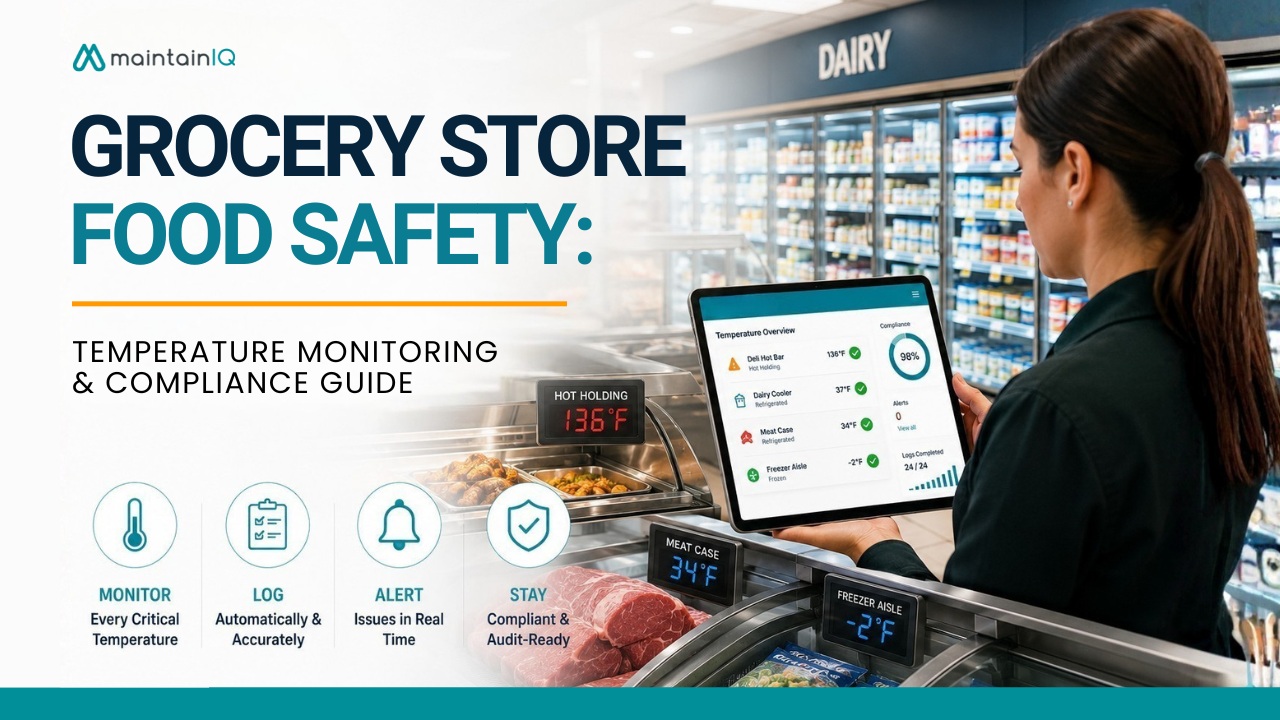
Grocery store food safety depends on one thing more than any other: consistent temperature control. Every department — from the deli hot bar to the dairy cooler to the frozen food aisle — runs on the assumption that refrigeration and holding equipment are maintaining safe temperatures around the clock.
When that assumption breaks down, the consequences hit fast: spoiled inventory, health inspection violations, foodborne illness risk, and customer trust that takes months to rebuild.
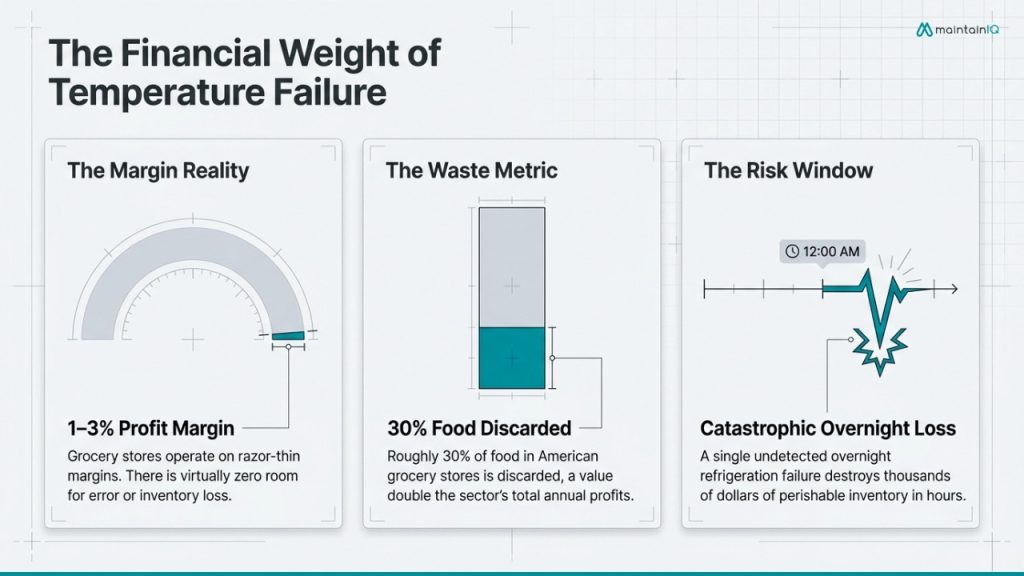
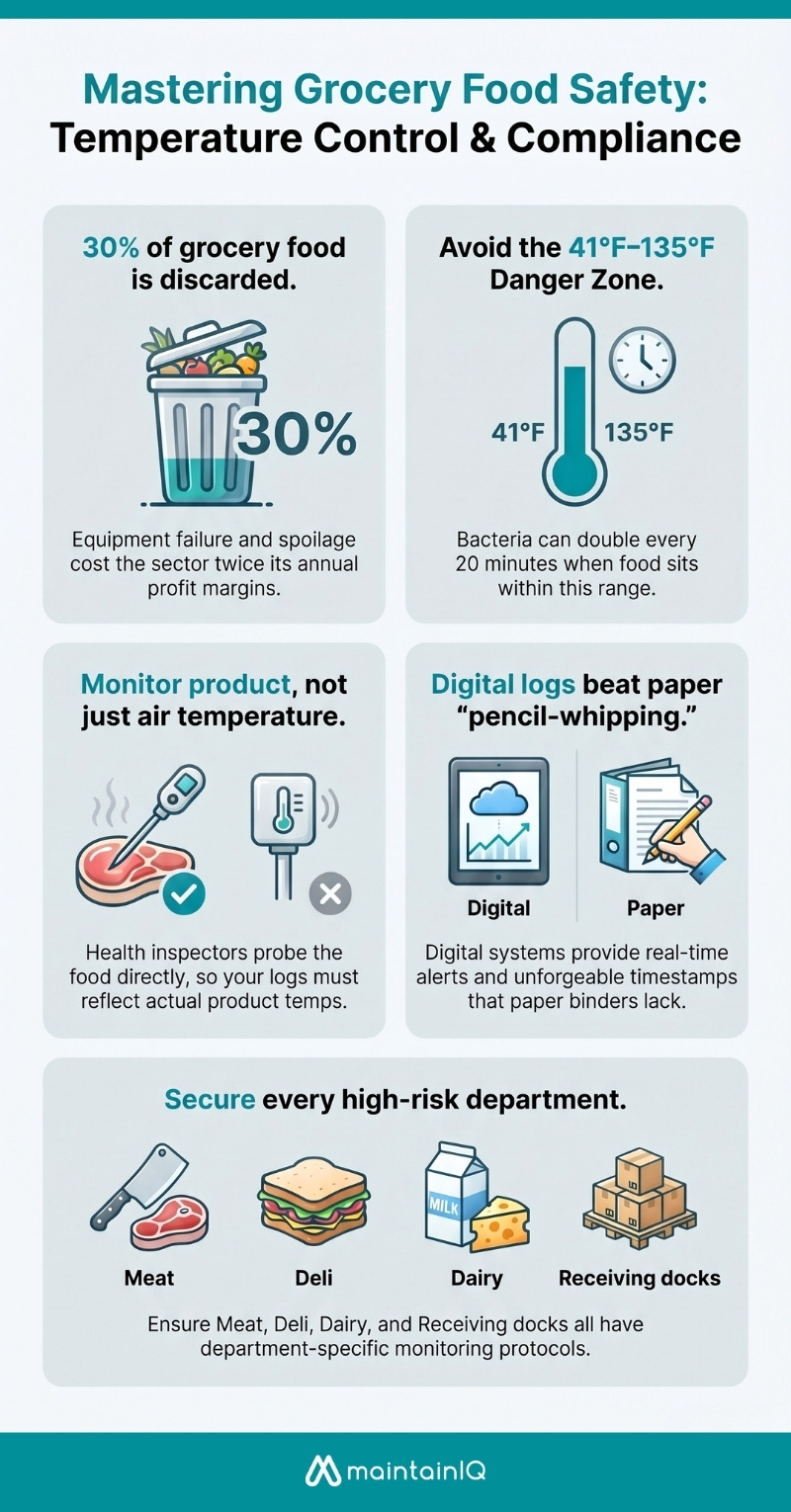
Grocery stores operate on margins of 1–3%. The USDA estimates that around 30% of food in American grocery stores is discarded, with the value of wasted food estimated at roughly twice the sector’s total annual profits.
Equipment malfunction — particularly faulty cold storage — is a leading cause of retail-level food loss. A single overnight refrigeration failure in a meat or dairy case can destroy thousands of dollars of perishable inventory in hours.
This guide covers every aspect of grocery store food safety temperature monitoring: which departments need it, what temperatures to maintain, what to include in your logs, where paper systems fail, and how to build an audit-ready compliance program that works across every store.
Table of Contents
Why Temperature Monitoring Matters More in Grocery Than Anywhere Else
Restaurants handle a predictable set of ingredients through a controlled cooking and serving process. Grocery stores are different. You’re managing hundreds of TCS (Time/Temperature Control for Safety) food items across multiple departments, display formats, and storage environments — simultaneously.
A single grocery location might operate walk-in coolers, walk-in freezers, reach-in refrigerators, open-air refrigerated display cases, closed-door frozen cases, deli hot cases, salad bars, hot bars, bakery display cases, and receiving docks — each with its own temperature requirements and failure modes. Multiply that by ten or twenty locations, and the monitoring challenge becomes enormous.
The FDA Food Code — which serves as the model regulation for state and local health departments governing grocery stores — requires that TCS foods be held at safe temperatures at all times, and health inspectors apply the same standards to a grocery dairy case as to a restaurant walk-in. Violations carry identical consequences: critical citations, fines, mandatory re-inspections, and potential closure.
CDC data records roughly 800 foodborne illness outbreaks annually in the U.S., causing around 15,000 illnesses — with temperature abuse consistently among the top contributing factors.
In a grocery setting, where hundreds of perishable items sit in cases for extended periods, the exposure window and monitoring burden are heavier than in virtually any other food operation.
Key Grocery Departments That Need Temperature Monitoring
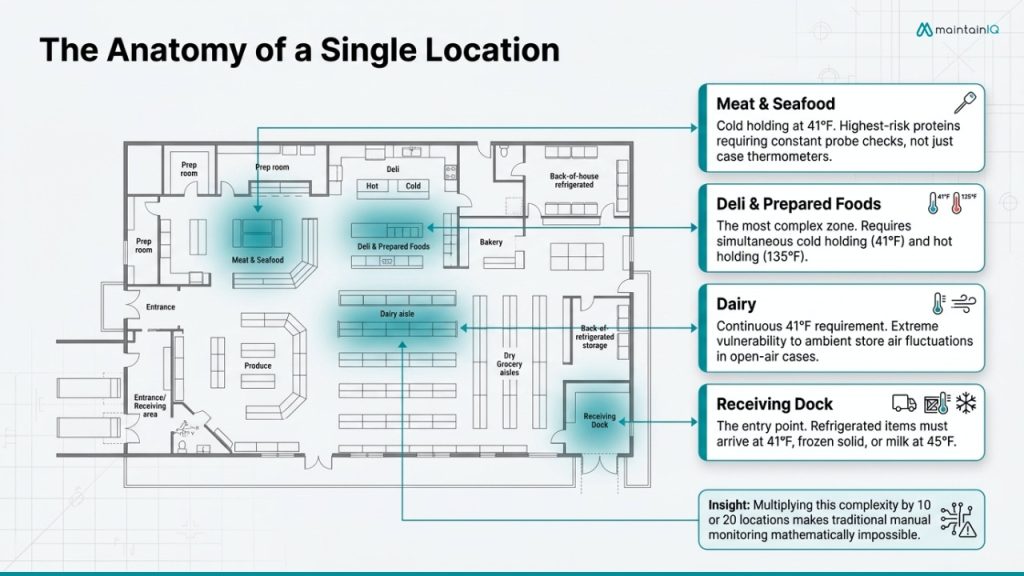
Every department handling TCS foods requires documented temperature monitoring. Here’s what each area involves and where the risks concentrate.
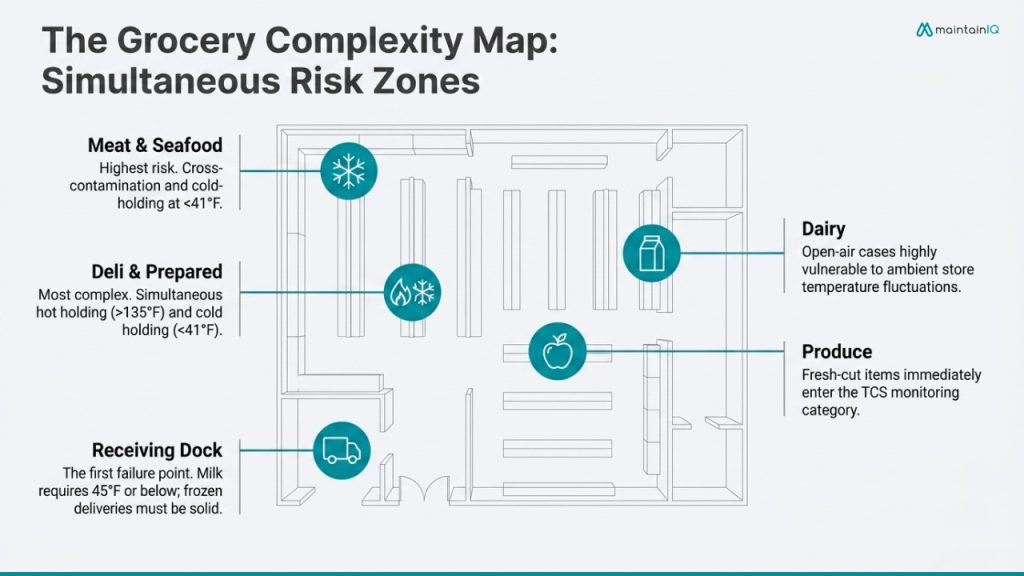
Meat and Seafood
Raw proteins are the highest-risk items in the store. Requirements:
- Cold holding at 41°F or below at all times — in walk-ins, cutting rooms, display cases, and during receiving
- Inspectors probe product in the case, not just the case thermometer
- Cross-contamination and temperature abuse during processing are the primary inspection targets
Deli and Prepared Foods
The most complex department. Two temperature thresholds apply:
- Cold items: 41°F or below
- Hot bar, rotisserie, and prepared meals: 135°F or above
- Cooling cooked items follows the FDA two-stage process: 135°F → 70°F within 2 hours, then 70°F → 41°F within 4 more hours
Common violation points: hot cases losing heat during slow periods, warming salad bars, foods transitioning between hot and cold.
Dairy
Dairy cases must maintain 41°F or below continuously.
- Open-air cases are especially prone to fluctuation as warm store air infiltrates
- Inspectors measure food temperature — not the display thermometer — making product-level monitoring essential
Produce
Fresh-cut produce (pre-washed salads, cut fruit, prepared vegetables) is classified as TCS and must be held at 41°F or below
- Whole, uncut produce does not require temperature control in most jurisdictions
- Once cut or processed, it enters the TCS category.
Frozen Foods
Frozen cases must maintain 0°F or below.
- Lower immediate illness risk than refrigerated TCS items, but temperature abuse during receiving or stocking can cause partial thawing and refreezing
- Creates quality issues, customer complaints, and potential safety concerns.
Bakery
Items containing cream, custard, or other TCS fillings require cold holding. Bakery departments that prepare items with eggs, dairy, or meat fillings must monitor holding temperatures for those products specifically. Dry baked goods without TCS ingredients generally don’t require temperature monitoring.
Receiving Dock
Temperature control starts at delivery.
- Refrigerated items must arrive at 41°F or below; frozen items must be frozen solid with no evidence of thawing.
- Milk and shellfish carry specific receiving requirements under the FDA Food Code.
- Without documented delivery temperature checks, there’s a gap at the very first step of your temperature control chain.
Safe Temperature Ranges Grocery Teams Must Know
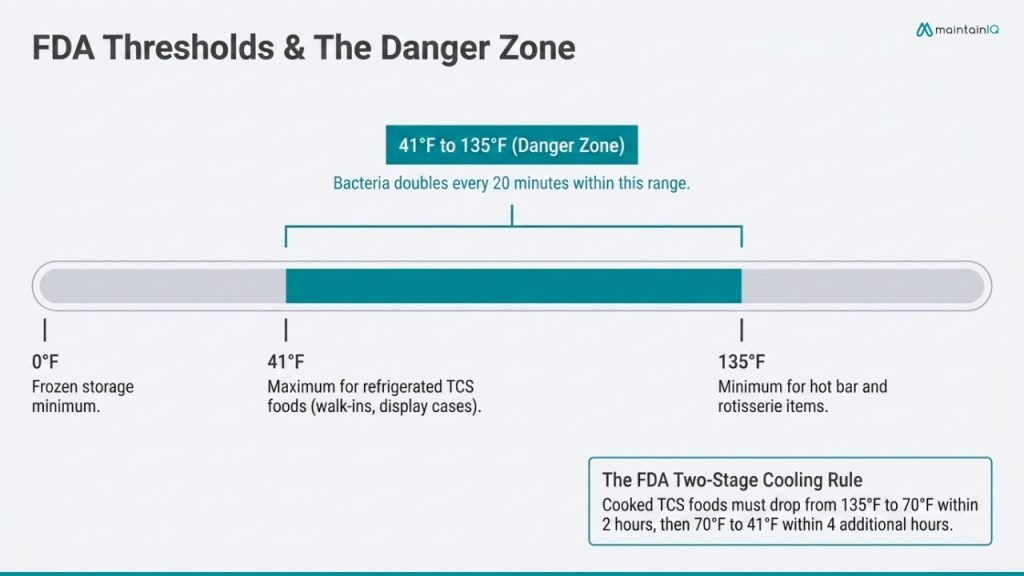
These are the FDA Food Code thresholds that health inspectors enforce. Some states set slightly different numbers — always verify your local code — but the FDA model is the baseline.
| Category | Temperature | Applies To |
| Cold Holding | 41°F (5°C) or below | Walk-in coolers, reach-ins, display cases, salad bars, prep coolers |
| Hot Holding | 135°F (57°C) or above | Hot bar items, rotisserie chicken, prepared soups, deli hot service |
| Danger Zone | 41°F – 135°F (5°C – 57°C) | TCS foods cannot remain here except during active cooking, cooling, or Food Code-specified time allowances |
| Frozen Storage | 0°F (-18°C) or below | All frozen cases and storage |
Refrigerated deliveries at 41°F or below. Frozen deliveries frozen solid. Milk at 45°F or below (per FDA Food Code) — though many operations use 41°F as the standard.
What Should Be in a Grocery Store Temperature Log
A temperature log that will hold up during a health inspection needs more than a time and a number. Complete logs include:
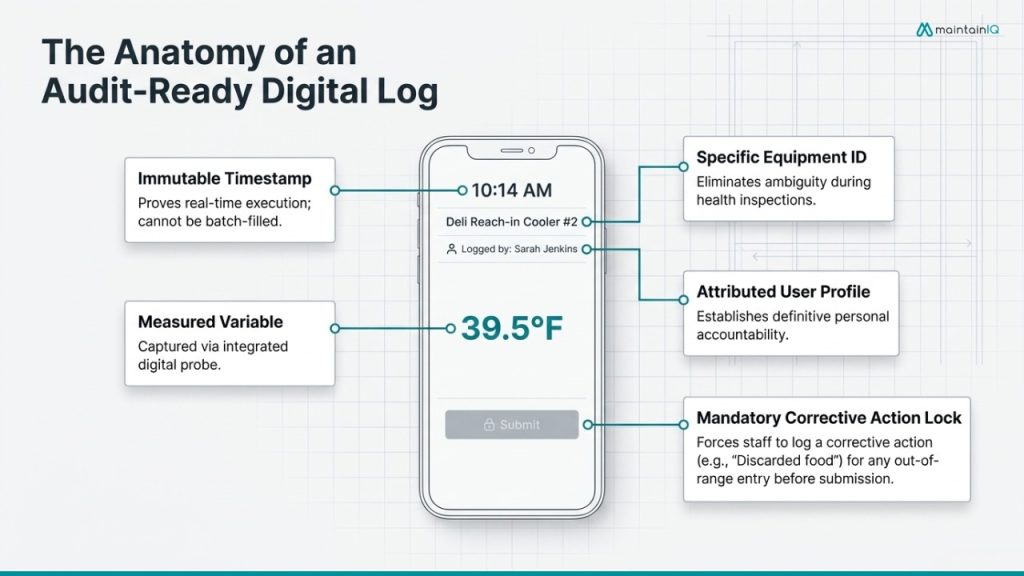
Date and time— of the reading. Logs with no time stamps, or with times that clearly follow a pattern (every entry at exactly :00 or :30), signal to inspectors that the log was batch-filled rather than completed in real time.
Equipment identification — which specific unit was checked (“Walk-in cooler” is insufficient if you have three; each needs a unique identifier).
Temperature reading — the actual measured temperature, taken with a calibrated thermometer. For display cases, this should be the product temperature or a probe placed in a representative food item, not the case’s built-in thermometer reading alone.
Employee name or initials — who took the reading. This creates accountability and allows managers to follow up when readings are missed or questionable.
Corrective action taken— if a reading is out of range, document exactly what was done: adjusted thermostat, moved product, discarded food, called for repair. A log showing an out-of-range temperature with no response is worse than no log at all.
Verification signature — a manager or supervisor who reviews the log and confirms corrective actions were completed.
This structure aligns with HACCP principles: monitoring, corrective action, verification, and record-keeping — the exact framework health inspectors use to evaluate your logs.
Temperature Monitoring Mistakes: Paper Logs vs. Digital Solutions
Even stores with good intentions make monitoring errors that create compliance exposure. Many stem directly from the limitations of paper-based systems.
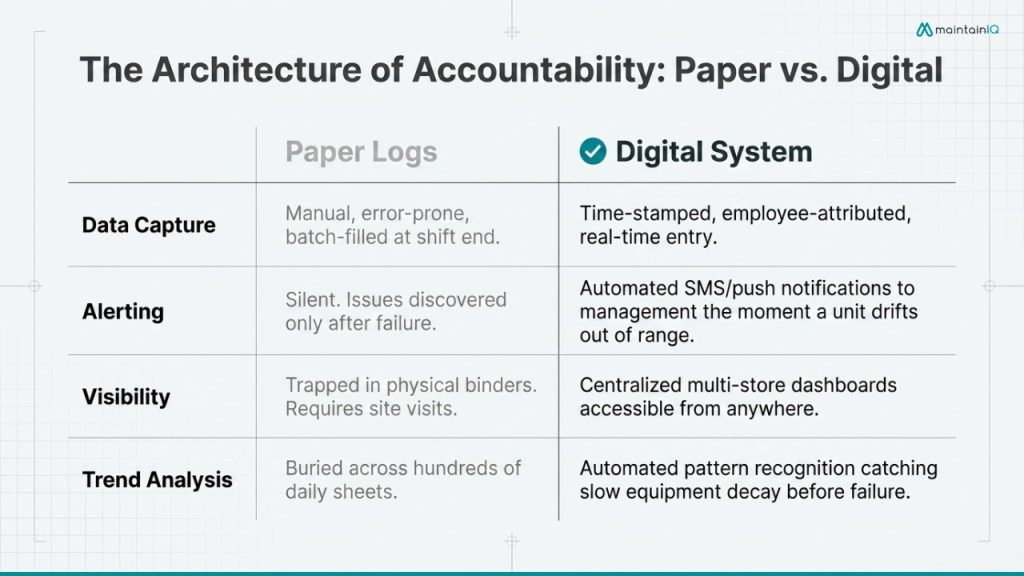
Checking the air temperature instead of the food temperature. A case thermometer reading 38°F doesn’t mean the milk inside is at 38°F. Product in the center of a display case may be warmer than product near the vents. Inspectors probe the food — your monitoring should too.
Logging temperatures at the end of the shift. This is the single most common documentation failure across all food operations. Staff fill out the entire log from memory, writing “safe” numbers for every check. Inspectors recognize this pattern immediately — identical handwriting, same ink, suspiciously consistent readings. Paper can’t prevent this; it has no accountability structure.
No corrective action documentation. A temperature reading of 46°F in a dairy case is a data point. Without a documented corrective action, it’s an unresolved critical violation sitting in your own records.
Monitoring only some departments. Walk-in coolers get checked because they’re large and visible. Open-air display cases, hot bar units, and receiving temperatures often get skipped — and those are exactly the areas inspectors target.
No overnight or after-hours monitoring. Paper logs can only record when staff are present. A cooler that fails at midnight goes undetected until morning. The window between closing and opening is the highest-risk period in most grocery stores. When a deli case loses power during a busy Saturday, nobody knows until someone notices the food feels warm.
No centralized visibility across locations. For multi-store operators, each location is a black box. There’s no way to know whether Store #7 completed its temperature checks today unless someone physically visits and reviews the binder.
Paper can’t be searched, analyzed, or trended. If a specific display case has been slowly warming over three weeks, that pattern is buried across 21 daily logs. Nobody sees it until the case fails and product is lost.
Digital temperature monitoring solves each of these limitations. Readings are time-stamped and attributed to specific employees. Out-of-range temperatures trigger real-time alerts to the manager’s phone. Logs are stored automatically and can be pulled for an inspector in seconds. And for multi-store operators, every location’s compliance data is visible from a single corporate reporting dashboard.
How Digital Checklists Improve Grocery Food Safety Compliance
Temperature monitoring is one component of a broader food safety program that also includes sanitation, date labeling, receiving verification, equipment maintenance, and staff hygiene. Digital checklists tie all of these together.
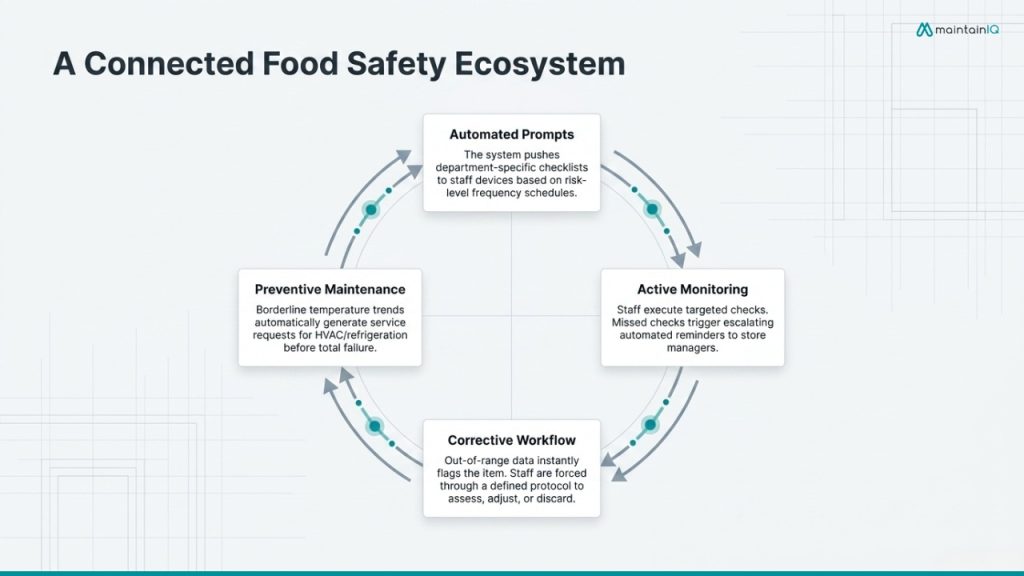
- Automated reminders prevent missed checks — if the 10 AM deli temperature check has not been completed by 10:15, the system sends a reminder; if still incomplete by 10:30, the store manager is alerted
- Corrective actions tracked to completion — the system requires employees to document what corrective action was taken before a check can be marked complete, then makes that action visible to management
- Audit trails build themselves — every completed check, every corrective action, every temperature reading is stored with a timestamp and employee attribution; no binder-searching when the inspector arrives
- Department-specific coverage — checklists built by department (deli, meat, seafood, dairy, produce, bakery, receiving) with each area’s specific tasks and temperature requirements built into the workflow
Building an Audit-Ready Grocery Food Safety Program
An audit-ready operation doesn’t scramble when the inspector arrives. It runs the same program every day — inspection or not — and the documentation is always current.
Here’s how to build that program:
Map every critical control point. Walk your store and identify every location where TCS foods are stored, displayed, prepared, or received. Each point needs a monitoring frequency, a responsible person, and a defined corrective action protocol.
Set monitoring frequencies by risk level. Walk-in coolers and freezers should be checked at minimum twice per day — once at opening and once during the mid-shift. Display cases, hot bars, and salad bars should be checked every two to four hours during operating hours. Receiving temperatures should be checked and documented for every delivery. These frequencies should be built into your digital checklists so they generate automatically.
Train every department on corrective actions. Staff need to know exactly what to do when a temperature is out of range — not just “tell the manager.” Define the specific steps: assess the food (how long has it been out of range?), take corrective action (adjust equipment, move product, discard if necessary), document what was done, and notify management. This protocol should be the same across every store.
Conduct regular internal audits. Monthly walk-throughs using the health department’s actual inspection criteria catch gaps before inspectors find them. Audit your temperature logs for completeness, verify that corrective actions were followed through, and check that calibration records for thermometers are current.
Connect temperature monitoring to maintenance. A display case that repeatedly shows borderline readings isn’t a monitoring problem — it’s an equipment problem. When your temperature data feeds into your preventive maintenance program, a trending issue triggers a service request before the case fails entirely. This connection between monitoring and maintenance is what separates proactive operators from reactive ones.
Multi-Store Operators: Why Centralized Monitoring Changes Everything
If you’re running five, fifteen, or fifty grocery locations, the food safety challenge multiplies with every store. Each location has dozens of refrigeration units, multiple departments preparing TCS foods, and a team that may or may not be following the same monitoring protocols as the store across town.
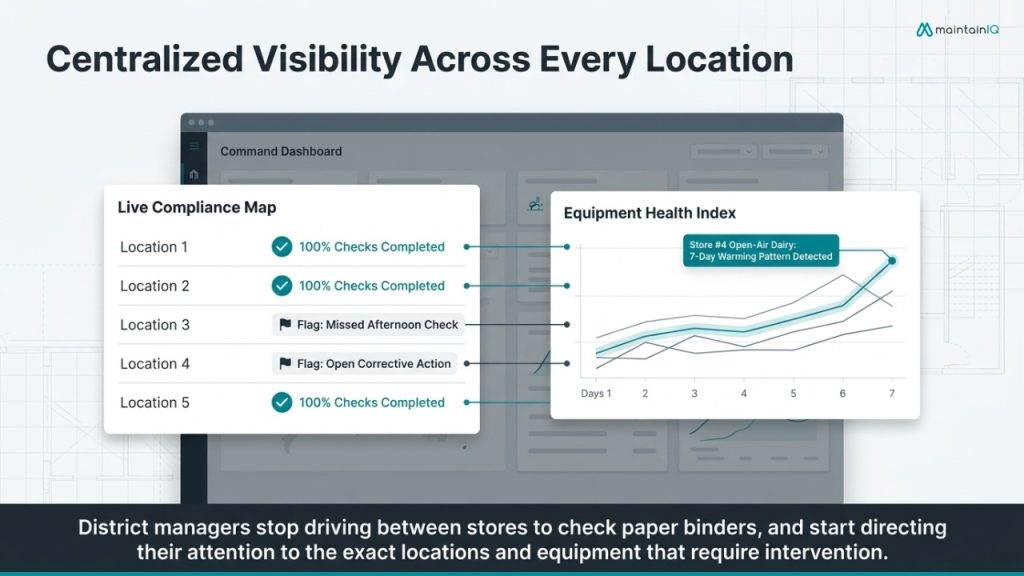
Standardized procedures across all locations. Every store runs the same checklists, monitoring frequencies, corrective action protocols, and documentation standards; without standardization, compliance quality varies by location and you do not know which stores are exposed until an inspector finds the gaps.
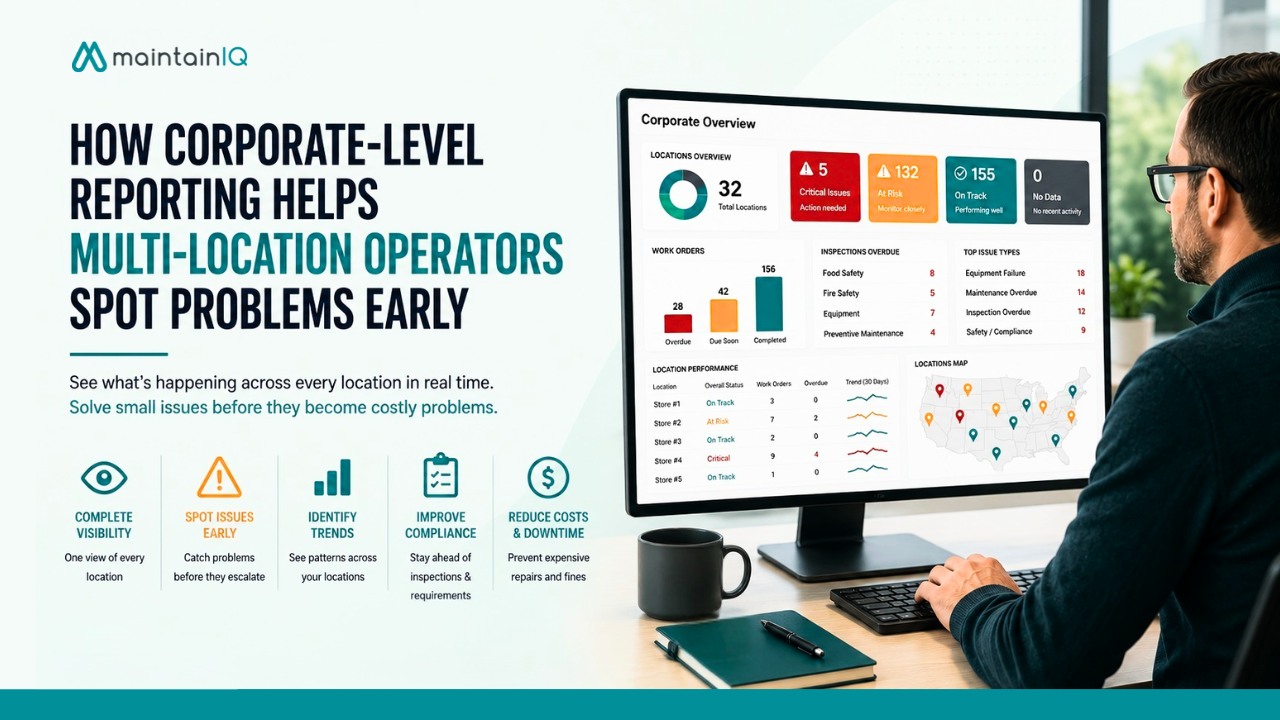
Real-time visibility without physical visits. Corporate-level reporting shows which stores completed their temperature checks today, which have open corrective actions, and which have equipment trending toward failure — all from one dashboard.
Benchmarking and pattern recognition. When data from every store flows into one system, you can compare performance. Which stores have the highest rate of out-of-range readings? Which departments consistently miss afternoon checks? Which locations have the most equipment-related corrective actions? This data drives training, staffing, and capital decisions at scale.
Consistent inspection readiness. When any store can produce complete, time-stamped temperature logs, corrective action records, and audit documentation in seconds, you’ve eliminated the single most stressful moment in grocery food safety — the unannounced visit from the health department.
How MaintainIQ Helps Grocery Stores Stay Compliant
Grocery store food safety is a system — not a single tool. Temperature monitoring, daily checklists, corrective action tracking, internal audits, equipment maintenance, and corporate reporting all need to work together. When they are disconnected, gaps form — and those gaps are where violations happen.
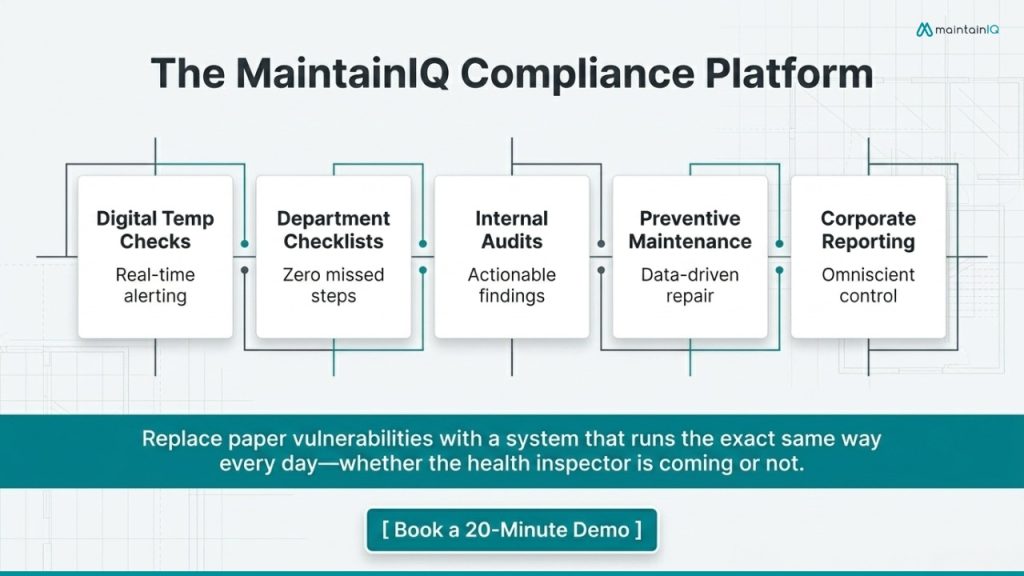
MaintainIQ connects all of these into one platform built for multi-location grocery store operations:
Digital Temp Checks — set up automated and manual temperature monitoring across every department and unit. Receive real-time alerts when readings drift out of range. Every log is time-stamped, employee-attributed, and stored automatically.
Digital Checklists — build department-specific food safety checklists that prompt staff through every task on schedule. Automated reminders ensure nothing gets skipped. Completion data is visible to management in real time.
Internal Audits & Inspections — run monthly mock inspections using the health department’s own criteria. Track findings, assign corrective actions, and verify completion — all documented and searchable.
Preventive Maintenance — schedule recurring maintenance for refrigeration, HVAC, and hot holding equipment. When temperature data reveals a trending issue, the system generates a work order to get it serviced before it fails.
Corporate Reporting — see temperature compliance, checklist completion rates, open corrective actions, and equipment status across every store from one dashboard.
Book a 20-minute demo to see how it works for grocery operations.
Conclusion
Grocery store food safety comes down to whether your temperature control system is actually working — not just whether someone checked a box on a clipboard. Every department, every display case, every walk-in, and every delivery requires monitoring that’s consistent, documented, and actionable when something goes wrong.
Paper logs cannot alert you to a midnight cooler failure. They cannot verify that corrective actions were completed. They cannot show your district manager which stores are compliant today — because they were filled out from memory at the end of the shift.
For grocery operators running multiple locations, the question isn’t whether to monitor temperatures. It’s whether your monitoring system catches problems before they become violations, spoilage events, or customer safety incidents. The stores that answer yes are the ones that replaced their clipboards with a system that runs the same way every day — whether the inspector is coming or not.
Ready to replace paper temperature logs with audit-ready digital records? Book a 20-minute demo to see how MaintainIQ helps grocery teams monitor temperatures, assign corrective actions, and keep every location inspection-ready from one platform.
Frequently Asked Questions
What temperature should grocery store refrigerators be?
The FDA Food Code requires 41°F (5°C) or below for all TCS foods, including walk-in coolers, reach-in refrigerators, dairy cases, and meat cases. Always measure food temperature directly — not just air temperature. Verify your state’s specific requirement, as some set the threshold at 40°F.
How often should grocery stores record temperatures?
At minimum, walk-in coolers and freezers should be checked twice daily. Display cases, hot bars, and salad bars should be checked every two to four hours during operating hours. Receiving temperatures should be checked and documented for every delivery. More frequent monitoring reduces the window for undetected temperature abuse.
What should staff do when a temperature reading is out of range?
Staff should immediately assess how long the food may have been at an unsafe temperature, relocate product or adjust equipment, and discard any TCS food held above 41°F (cold) or below 135°F (hot) for more than four hours. All actions must be documented and management notified. An undocumented corrective action provides no protection during a health inspection.
Are digital temperature logs accepted by health inspectors?
Yes. The FDA Food Code recognizes electronic recordkeeping, and the majority of state and local health departments accept digital logs. Timestamped records with employee attribution and documented corrective actions typically meet — and often exceed — inspection standards.
What grocery departments need temperature monitoring?
Every department handling TCS foods requires monitoring: meat, seafood, deli, prepared foods, dairy, produce (for fresh-cut items), bakery (for cream or custard-filled items), and frozen foods. The receiving dock also requires temperature documentation for every incoming delivery of refrigerated or frozen product.